
 Matthew David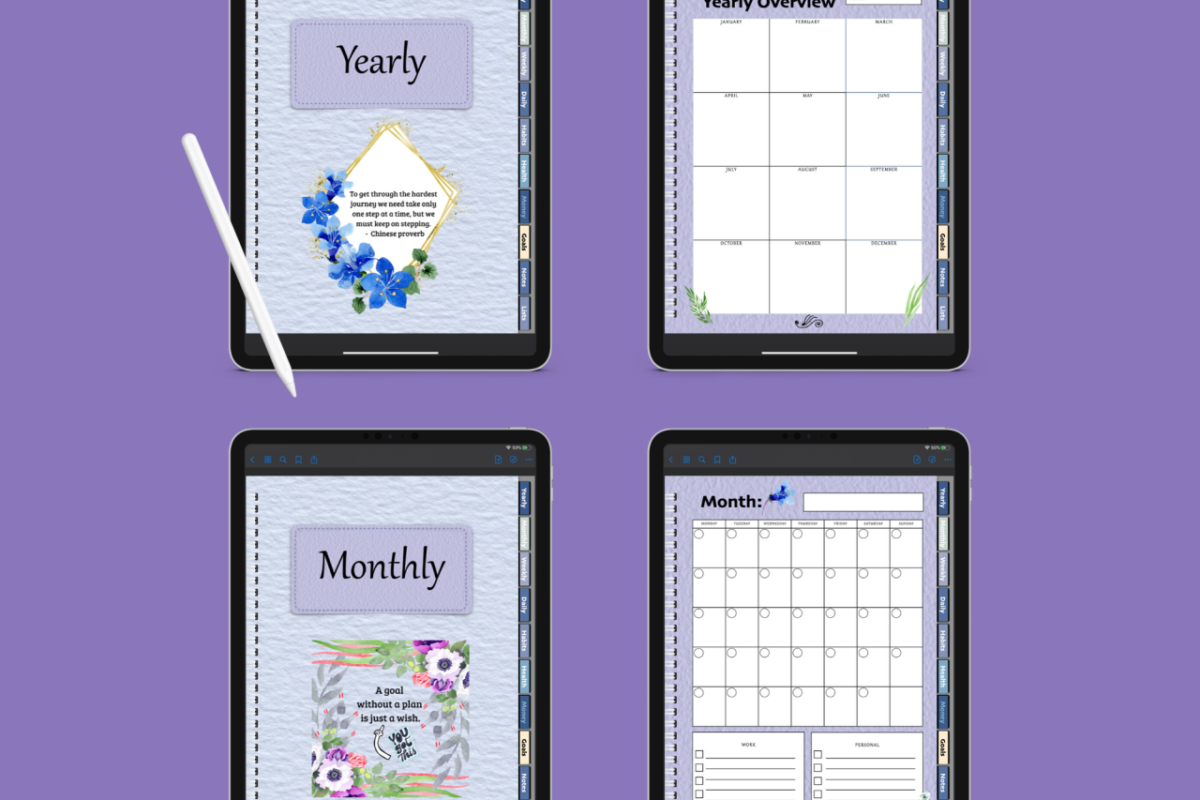
Digital planners are changing the way we organize our lives, offering a modern twist on traditional planning methods. With the rise of technology, many individuals are opting for digital solutions that enhance efficiency and streamline their daily tasks. These planners not only replace pen and paper but also integrate features that boost productivity and personalization.
This guide delves into the myriad benefits of digital planners, comparing popular applications, and discussing customization options that cater to individual needs. Whether you are a busy professional or a student juggling multiple responsibilities, digital planners provide a versatile platform to manage your time effectively. Discover how these tools can transform your planning experience and what the future holds for digital organization.
The Benefits of Using a Digital Planner
Digital planners have surged in popularity, thanks to their modern approach to organization and productivity. Unlike traditional paper planners, which can be cumbersome and less adaptable, digital planners offer a range of features that cater to the dynamic lifestyles of today’s users. With advancements in technology, digital planners combine convenience with functionality, making them an essential tool for anyone looking to optimize their time management and stay organized.
Digital planners can significantly enhance productivity by leveraging various technological features that streamline tasks and improve organization. One of the primary advantages is the ability to sync across multiple devices. This means that whether you’re using your phone, tablet, or computer, you can access your schedule and notes from anywhere. This seamless integration allows for real-time updates, which ensures that you never miss an appointment or deadline.
Furthermore, many digital planners offer customizable templates and layouts that cater to individual needs. Users can create to-do lists, set reminders, and even categorize their tasks based on priority, which is often challenging to achieve with a paper planner. The search feature in digital planners allows for quick access to notes or specific tasks, saving valuable time when looking for information.
Key Features of Digital Planners
The appeal of digital planners lies in their myriad features that enhance user experience and productivity. Understanding these features can help users maximize their planner’s potential.
- Cloud Storage: Digital planners often come with cloud integration, ensuring that your data is secure and accessible from any device.
- Customizable Reminders: Set alerts for important deadlines and appointments to stay on track with your tasks.
- Collaboration Tools: Many digital planners allow multiple users to collaborate on projects, making teamwork more efficient.
- Visual Tools: Incorporate charts, graphs, and other visual aids to better understand your schedule and tasks at a glance.
- Integrations: Connect with other productivity apps and tools, such as calendars and note-taking applications, for streamlined workflows.
Digital planners also often incorporate analytical features that help users assess their productivity levels over time. By tracking completed tasks and time spent on various activities, users gain valuable insights into their habits, allowing for better planning in the future.
“The right digital planner can transform your time management habits, making you not just organized but also more efficient.”
Comparing Popular Digital Planner Applications
Digital planners have become essential tools for individuals and businesses alike, providing a streamlined way to manage tasks, schedules, and long-term goals. With the rise in demand for efficient digital planning solutions, numerous applications have emerged, each offering unique functionalities and user experiences. This comparison highlights three popular digital planner applications: Notion, Todoist, and Trello, focusing on their core features, benefits, and differentiating elements in the market.
Notion
Notion is a versatile workspace that combines note-taking, task management, and database capabilities into a single app. It provides a customizable platform where users can create their own workflows and organizational systems.
– User Experience: Notion offers a clean and intuitive interface that allows for easy navigation. Users can create and organize notes, databases, and tasks in a visually appealing manner. The ability to toggle between list, board, and calendar views enhances usability.
– Unique Features: Notion stands out with its highly customizable templates, allowing users to build personal dashboards tailored to their needs. It integrates seamlessly with applications like Google Drive and Slack, making it an excellent choice for collaborative projects.
“Notion is not just a planner; it’s a complete productivity suite that adapts to your workflow.”
Todoist
Todoist is renowned for its simplicity and effectiveness in task management. It focuses primarily on helping users organize their daily tasks and projects using an easy-to-use interface.
– User Experience: The app features a minimalist design that is both functional and user-friendly. Users appreciate the ease of adding tasks and setting due dates, as well as the ability to prioritize tasks using color-coded labels.
– Unique Features: Todoist’s Karma system gamifies productivity, allowing users to earn points for completing tasks and achieving goals. This feature encourages consistent engagement and motivates users to stay on track with their tasks.
“Todoist makes task management feel rewarding, turning productivity into a game.”
Trello
Trello is a visual project management tool that uses boards, lists, and cards to organize tasks. It is particularly popular among teams and project managers for its collaborative features.
– User Experience: Trello’s drag-and-drop interface allows for easy reorganization of tasks and projects. Users can visually track the progress of their work through customizable boards, which can be shared with team members.
– Unique Features: Trello’s Power-Ups enhance functionality by integrating with other tools like Google Drive, Slack, and GitHub. These integrations provide additional features such as calendar views and automated workflows, making Trello a comprehensive tool for team collaboration.
“Trello’s visual approach to task management helps teams stay aligned and organized.”
In summary, each digital planner application offers distinct advantages that cater to different user needs. Notion provides a customizable workspace, Todoist focuses on straightforward task management with motivational features, and Trello excels in visual project management and collaboration. Selecting the right app depends on personal or team preferences, specific functionalities desired, and the overall workflow requirements.
Customization Options in Digital Planners
Digital planners have gained immense popularity due to their flexibility and user-friendly interfaces. One of the most appealing features of these planners is the ability to customize them to suit individual preferences and lifestyles. This personalization not only enhances usability but also boosts user engagement and satisfaction.
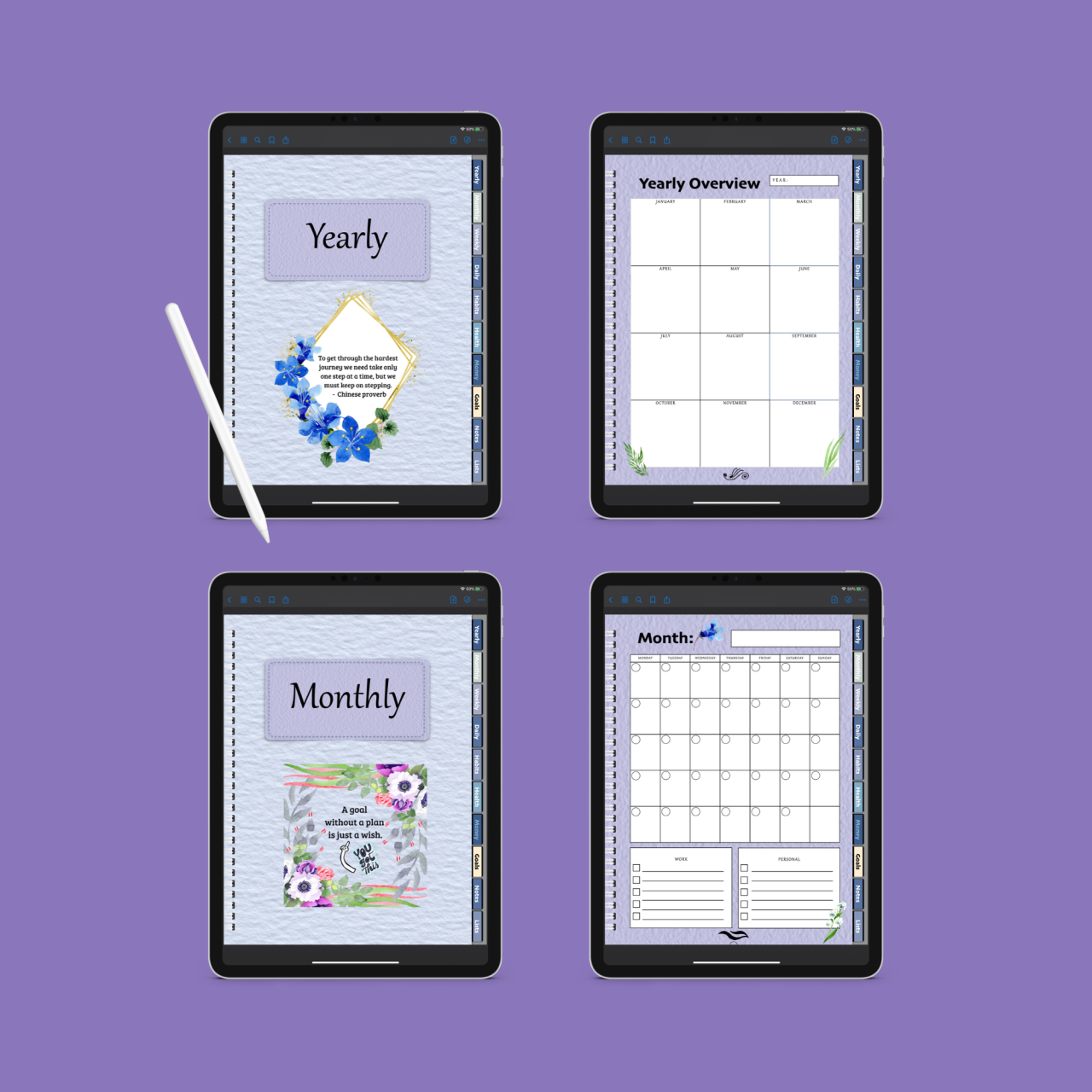
Users can personalize their digital planners through a variety of features including themes, colors, and layout designs. The customization options allow them to create a planning system that resonates with their personal taste and organizational needs. The availability of various templates and layouts plays a crucial role in this personalization process, enabling users to choose what best fits their planning style.
Templates and Layouts for Customization
Digital planners typically offer a range of templates and layouts that cater to different needs and preferences. These templates can significantly enhance the planning experience by providing structured frameworks for users to organize their thoughts and activities.
Some common templates include:
- Daily Planner: Designed for users who prefer detailed daily scheduling, this template often includes time slots and task lists for each day.
- Weekly Overview: This layout allows users to see their week at a glance, making it easier to plan activities and appointments.
- Monthly Calendar: Ideal for long-term planning, this template provides a comprehensive view of the month, helping users track important dates and deadlines.
- Goal Setting: Focused on helping users define and track their goals, this template usually includes sections for milestones and timelines.
The flexibility of these templates helps users improve their engagement with the planner. When individuals can select a layout that aligns with their workflow, they are more likely to use it consistently.
“Customization in digital planners is not just about aesthetics; it’s about creating a personal tool that enhances productivity and satisfaction.”
Moreover, users can customize fonts, colors, and backgrounds, making their planner visually appealing and uniquely theirs. For instance, a user might choose calming pastel colors and friendly fonts to create a stress-free environment for planning. Another might prefer bold colors and a modern font to foster motivation and energy.
Real-life examples illustrate this impact; for example, a freelance graphic designer who customized their planner with vibrant colors and creative layouts reported an increase in productivity. They found that engaging with a planner that reflected their style kept them motivated and organized.
Ultimately, customization options in digital planners empower users to take control of their planning processes. By selecting templates and layouts that resonate with their personal and professional needs, individuals can enhance their overall experience, leading to greater satisfaction and effectiveness in their daily lives.
Integrating Digital Planners with Other Tools
Digital planners have become essential tools for organizing our lives, and their functionality can be significantly enhanced by integrating them with other applications. By synchronizing digital planners with calendar and task management tools, users can streamline their workflows and enhance productivity. This integration allows for seamless scheduling and task management, ensuring nothing falls through the cracks.
To effectively integrate digital planners with other tools, understanding the available options is crucial. Many digital planners offer built-in features or third-party integrations that connect with popular tools such as Google Calendar, Microsoft Outlook, or task management apps like Trello and Asana. This ensures that all tasks and appointments are visible in a single interface, thus eliminating the need for multiple platforms.
Synchronizing Calendars and Task Management Tools
A synchronized system for scheduling and tasks offers numerous advantages, including improved time management and reduced cognitive load. When digital planners are connected to calendars and task management applications, users experience:
- Real-time updates: Changes made in one tool reflect instantly across all connected platforms, ensuring everyone is on the same page.
- Centralized information: All tasks, deadlines, and events are accessible from one location, reducing the risk of overlooking important commitments.
- Enhanced collaboration: Team members can view shared calendars and tasks, making it easier to coordinate schedules and responsibilities.
- Increased accountability: Task assignments and deadlines are clearly visible, fostering a sense of ownership and commitment among team members.
To maximize efficiency in integrating digital planners with other tools, consider the following methods:
- Choose compatible tools: Ensure that your digital planner works well with popular tools you already use. Reviewing integration documentation can help identify compatible applications.
- Utilize automation: Employ automation tools like Zapier or IFTTT to create workflows that connect your digital planner with other applications, automating tasks such as adding new events or reminders.
- Regularly update settings: Periodically review integration settings to ensure that syncing is working smoothly and that any updates or changes to the tools are accommodated.
- Invite team collaboration: Encourage team members to link their calendars and task lists, enhancing collective productivity and ensuring alignment across projects.
“Integration is the key to a streamlined workflow, transforming the way we manage time and tasks.”
By properly integrating digital planners with calendars and task management tools, users can create a more cohesive and efficient system, ultimately leading to increased productivity and better organization in both personal and professional realms.
The Future of Digital Planning
The landscape of digital planning is rapidly evolving, driven by technological advancements and changing user needs. As we look ahead, it’s essential to consider how emerging trends in digital planning technology and tools will shape the ways we organize our lives. Innovations in artificial intelligence, mobile integration, and user experience design are just the beginning of what is possible in this dynamic field.
As digital planners become more sophisticated, several key advancements are expected to revolutionize user interactions and functionalities. These developments will not only enhance organization and productivity but will also create a more tailored experience for individual users based on their preferences and behaviors.
Emerging Trends in Digital Planning Technology
The integration of advanced technologies into digital planning is transforming the way users manage their tasks and schedules. Here are some significant trends shaping the future:
- Artificial Intelligence: AI-driven features will enable planners to anticipate user needs, offering personalized recommendations and automating routine tasks. For example, an AI planner could suggest optimal times for meetings based on past user behavior and preferences.
- Voice Activation: The rise of voice assistants facilitates hands-free planning. Users will be able to add tasks or set reminders simply by speaking, making digital planners even more accessible.
- Seamless Integration: Future digital planners will likely integrate with various applications and devices. This will allow for a more cohesive experience, where users can manage everything from calendars to project management tools in one place.
- Enhanced Collaboration Features: As remote work continues to be prevalent, digital planners will incorporate better collaborative tools that allow multiple users to interact in real time, sharing tasks and updates seamlessly.
- Augmented Reality: AR could provide users with a more interactive experience by visually representing tasks and deadlines in their real-world environment, enhancing engagement and comprehension.
The impact of these advancements on user experience will be significant. As digital planners become more intuitive and responsive, users can expect a more streamlined approach to managing their schedules. The ability to access and manipulate data across various platforms will enhance productivity and minimize the overwhelm often associated with multitasking.
Impact of Advancements on User Experience and Functionality
User experience in digital planning is being redefined with the advent of these technologies. The following insights illustrate how these changes may influence functionality and satisfaction:
- Increased Customization: Users will have more control over their planning interfaces, allowing them to tailor layouts, colors, and features based on personal preferences or specific tasks.
- Predictive Analytics: Digital planners will employ data analysis to predict deadlines and task durations, aiding users in better managing their time and commitments.
- Improved User Interfaces: Future planners will focus on user-friendly designs that simplify navigation and enhance usability, making it easier for users to locate and manage their tasks efficiently.
- Real-time Feedback: Instant notifications and reminders will keep users informed about deadlines and task progress, promoting accountability and consistent engagement with their planning tools.
- Integration of Wellness Features: Recognizing the importance of mental health, planners may incorporate wellness functionalities, such as reminders to take breaks or mindfulness prompts, ensuring a balance between work and personal life.
As technology continues to advance, the future of digital planning is not just about efficiency; it is about creating a holistic experience that caters to the user’s lifestyle and needs.
Tips for Transitioning from Paper to Digital Planners
Transitioning from a paper planner to a digital planner can be a rewarding experience that enhances productivity and organization. While the shift may seem daunting, it opens up a world of flexibility and features that paper planners cannot offer. This guide provides a step-by-step framework to facilitate your transition, along with insights into common challenges and available resources.
Step-by-Step Guide for Transitioning
Starting your journey from paper to digital planning requires a structured approach to ensure a smooth transition. Follow these steps to get started:
- Assess Your Needs: Determine what features are most important to you. Whether it’s task management, calendar integration, or note-taking, identifying your priorities will guide your choice of digital planner.
- Choose the Right Digital Planner: Research various digital planners available on the market. Look for user-friendly interfaces and features that align with your planning style.
- Migrate Existing Information: Begin transferring important dates, tasks, and notes from your paper planner to your chosen digital planner. This could be done manually or by using digital tools for scanning.
- Familiarize Yourself with Software: Spend time exploring the functionalities of your digital planner. Most planners have tutorials or user guides to help you understand how to maximize their features.
- Create a Daily Routine: Establish a habit of using your digital planner daily. Set reminders and notifications to prompt you to engage with the app regularly.
Common Challenges and Solutions
Transitioning to a digital planner might not be without its difficulties. Here are common challenges and strategies to overcome them:
Adjustment to Technology: Some users find adapting to digital interfaces challenging, especially if they are accustomed to paper.
To address this, dedicate time to learning the digital tools through online tutorials or community forums.
Lack of Physical Interaction: The tactile feel of paper can be missed, making it tough to adjust.
Consider using a stylus on a tablet or touchscreen device that allows for handwritten notes, bridging the gap between digital and physical interaction.
Overwhelm with Features:
Many digital planners offer extensive features that can be overwhelming. Take it slow by focusing on one feature at a time until you feel comfortable.
Resources and Support for Transitioning
Numerous resources exist to assist you in your transition from paper to digital planning. Utilize the following tools and communities:
- User Guides and Tutorials: Most digital planners provide comprehensive user manuals and video tutorials to help new users navigate their features.
- Online Communities: Join forums or social media groups dedicated to digital planning. These platforms often share tips, strategies, and experiences from fellow users.
- Webinars and Workshops: Look for online workshops that provide hands-on training in using specific digital planning tools.
- Blogs and YouTube Channels: Many planning enthusiasts share their insights and experiences, offering valuable guidance on best practices and tips.
Evaluating Effectiveness of Digital Planners in Time Management
Digital planners have increasingly become essential tools for individuals seeking to enhance their time management skills. Their effectiveness can be evaluated through various methods and criteria that help users assess how well these planners are serving their needs. Understanding these evaluation techniques not only helps in selecting the right planner but also in maximizing its potential.
Evaluating the effectiveness of digital planners requires a structured approach that encompasses both qualitative and quantitative metrics. Users can track their progress over time, assess how well they adhere to their planned schedules, and reflect on their overall productivity levels. This evaluation can reveal important insights into the planner’s impact on time management.
Methods for Evaluating Digital Planner Effectiveness
To effectively assess the performance of digital planners, users should consider implementing the following methods:
- Time Tracking: Regularly monitor how much time is spent on planned tasks versus actual time spent. This can highlight discrepancies and help refine future planning.
- Goal Achievement Rate: Evaluate the percentage of set goals that are achieved within the planned timeframes. This metric can indicate the planner’s effectiveness in helping users reach their objectives.
- Productivity Journals: Maintain a journal to reflect on daily or weekly experiences with the planner. This qualitative data can provide insights into areas of improvement.
- Feedback Loops: Establish a routine for gathering feedback on planner usability and effectiveness, either through self-reflection or through discussions with peers.
Case Studies Demonstrating Successful Time Management
Real-life examples of individuals or teams that have successfully utilized digital planners to enhance their time management skills can provide valuable insights.
One noteworthy case is that of a project manager at a tech startup who adopted a digital planner to streamline their workflow. By integrating task lists, deadlines, and reminders into a centralized system, they were able to reduce project delays by 30% over six months. The planner enabled them to prioritize tasks more effectively and allocate resources efficiently.
Another example features a college student who used a digital planner to juggle academics and extracurricular activities. By meticulously organizing their schedule and setting specific deadlines, the student improved their GPA by a full letter grade, attributing this success to the structured approach the planner provided.
Criteria for Assessing Planning Effectiveness
When evaluating the effectiveness of digital planners, users should consider several critical criteria:
- User-Friendliness: The planner should be intuitive and easy to navigate, allowing users to focus on their tasks rather than struggle with the interface.
- Customization Options: The ability to personalize the planner to fit individual needs can greatly enhance its effectiveness.
- Integration Capabilities: A planner that works seamlessly with other tools and applications can provide a more cohesive planning experience.
- Accessibility: The planner should be accessible across various devices, ensuring users can manage their time anytime, anywhere.
“The effectiveness of a digital planner is not just about organization but also about facilitating a productive mindset.”
Conclusive Thoughts
In conclusion, digital planners represent a significant advancement in how we approach organization and productivity. By leveraging technology, users can enjoy customizable features, seamless integration with other tools, and a wealth of resources for personalizing their planning experience. As the landscape of digital planning continues to evolve, the opportunities for enhanced time management and productivity are limitless. Embrace the change and make the most of your planning journey with a digital planner.
Detailed FAQs
What is a digital planner?
A digital planner is an electronic tool used for organizing tasks, schedules, and notes, often available as an app or software.
Are digital planners better than paper planners?
Many find digital planners more efficient due to their flexibility, integration capabilities, and accessibility across devices.
Can I use a digital planner offline?
Some digital planners offer offline functionality, allowing you to access and edit your plans without an internet connection.
How do I choose the best digital planner for my needs?
Consider factors like user interface, features, integration options, and whether it suits your specific planning style.
Are there free digital planner options available?
Yes, many digital planners offer free versions with basic features, making them accessible for everyone.
Can I customize my digital planner?
Most digital planners allow for extensive customization, including layouts, templates, and color schemes, to suit your preferences.