
 Matthew David
Task automation software is reshaping how businesses operate, allowing them to streamline processes and increase productivity. In a world where time is money, the ability to automate repetitive tasks can lead to significant gains in efficiency and focus on core activities. This technology has evolved dramatically since its inception, transforming industries by reducing human error and accelerating workflows.
From its early beginnings, task automation has grown from simple mechanical tools to sophisticated software solutions that integrate artificial intelligence and machine learning. Industries ranging from finance to healthcare are leveraging these advancements, enjoying the benefits of improved accuracy, reduced operational costs, and enhanced employee satisfaction. Understanding the key components of task automation software is essential for businesses aiming to thrive in today’s competitive landscape.
Understanding the fundamentals of task automation software
Task automation software is a powerful tool designed to streamline and optimize repetitive tasks, allowing organizations to improve efficiency and reduce the margin for human error. By automating routine activities, businesses can allocate their resources more effectively and focus on higher-level strategic initiatives. This kind of software can be tailored to meet the specific needs of various industries, making it an essential component of modern operational strategies.
Task automation has its roots in the industrial revolution, where machinery began to replace manual labor in factories. Over the years, as technology evolved, so did the concept of automation. The introduction of computers in the late 20th century marked a significant turning point, leading to the development of software that could automate tasks previously performed by humans. Initially, early automation software focused on simple, repetitive tasks like data entry. However, as programming languages became more sophisticated, the capabilities of automation software expanded, allowing for complex workflows and integrations with other systems. This evolution has led to the rise of advanced automation solutions, including robotic process automation (RPA) and artificial intelligence (AI)-driven tools.
Key components of task automation software
Understanding the key components of task automation software is essential for leveraging its full potential. The following elements contribute to the effectiveness of automation solutions:
- User Interface (UI): An intuitive UI allows users to easily design, manage, and monitor automated tasks without requiring extensive technical knowledge.
- Integration Capabilities: The software must seamlessly connect with existing systems, applications, and databases to facilitate data exchange and continuity across workflows.
- Task Scheduler: A robust scheduling feature enables users to set triggers for automated tasks, whether on a time-based schedule or in response to specific events.
- Reporting and Analytics: Built-in analytics tools provide insights into the performance of automated tasks, helping organizations identify bottlenecks and areas for improvement.
- Security Features: Given the sensitive nature of data handled by automation software, robust security protocols are crucial to protect against unauthorized access and data breaches.
The industries that benefit most from task automation software include finance, healthcare, retail, and manufacturing. In finance, automation can handle transactions and compliance checks, reducing the risk of human error. Healthcare organizations use automation to streamline patient data management and appointment scheduling. Retail businesses leverage automated inventory management systems to ensure product availability while optimizing stock levels. Lastly, manufacturing sectors utilize automation for supply chain management and quality assurance, enhancing overall productivity and efficiency. As technology continues to advance, the scope and capabilities of task automation software are expected to further expand, making it an indispensable tool across all industries.
Exploring the benefits of implementing task automation software in businesses
Task automation software has become an essential tool for businesses aiming to enhance productivity and streamline operations. By automating repetitive tasks, organizations can focus on strategic initiatives that drive growth and innovation. The implementation of task automation software not only increases efficiency but also leads to significant cost savings, making it a wise investment for businesses of all sizes.
One of the most compelling advantages of task automation is the ability to streamline various processes that can significantly enhance operational efficiency. For instance, tasks such as data entry, invoice processing, and customer relationship management can be automated. By automating these processes, businesses reduce the occurrence of human errors and the time spent on manual tasks. This means that employees can redirect their efforts towards more valuable activities that require critical thinking and creativity.
Specific processes that can be automated and efficiency gains
A variety of business processes can be effectively automated, leading to noticeable improvements in efficiency. Some notable examples include:
- Data Entry: Automating data input reduces the risk of inaccuracies and frees up staff to focus on analysis rather than mundane typing tasks.
- Email Marketing: Automation tools can schedule and send targeted email campaigns, ensuring timely communication with customers and enhancing engagement rates.
- Customer Support: Chatbots can handle basic inquiries and provide assistance 24/7, improving customer satisfaction while allowing human agents to tackle more complex issues.
- Payroll Processing: Automating payroll not only minimizes mistakes but also ensures employees are paid accurately and on time, enhancing trust and morale.
These efficiency gains are not just theoretical. For example, companies implementing automated data entry processes have reported reductions in processing times by up to 80%. This dramatic improvement enables faster decision-making and enhances responsiveness to market changes.
Cost reductions and improved resource allocation
Task automation translates directly into cost savings in multiple ways. First, reduced labor costs are achieved as fewer employees are required to manage automated tasks. Additionally, the minimization of errors leads to lower costs associated with rectifying mistakes, which can be both time-consuming and expensive. Furthermore, businesses can make better use of their resources since employees can concentrate on higher-value work rather than repetitive tasks.
For instance, a manufacturing firm that automated its inventory management saw a 30% reduction in overhead costs due to less wasted material and optimized labor utilization. This allowed for reallocating funds towards research and development, fostering innovation.
“By leveraging task automation, companies unlock the potential to not only save costs but also to enhance employee satisfaction and drive strategic initiatives.”
Evaluating different types of task automation software available in the market
Task automation software is a vital asset for organizations looking to enhance efficiency and minimize manual workload. Various types of automation solutions cater to different business needs, including Robotic Process Automation (RPA), workflow automation, and business process management (BPM). Each category offers unique features that can streamline operations, reduce errors, and save time.
Task automation solutions can be categorized into several types, each with distinct functionalities. Robotic Process Automation (RPA) focuses on automating repetitive tasks through software robots that mimic human actions, making it ideal for data entry and processing. Workflow automation, on the other hand, streamlines processes by automating the flow of tasks between team members, ensuring that the right people are notified and involved at every step. Business Process Management (BPM) encompasses a broader scope, allowing organizations to model, implement, and monitor processes holistically.
Comparative Analysis of Popular Task Automation Solutions
When evaluating task automation software, businesses should consider features like integration capabilities, ease of use, and pricing. Below is a comparative table highlighting some popular solutions:
| Software | Key Features | Pricing |
|---|---|---|
| UiPath | RPA, AI integration, extensive community support | Starts at $1,500/user/year |
| Zapier | Workflow automation, easy app integration, user-friendly interface | Starts at $19/month |
| Monday.com | Customizable workflows, collaboration tools, reporting features | Starts at $8/user/month |
| Automation Anywhere | RPA, bot management, cloud-native platform | Contact for pricing |
When choosing the right task automation software, businesses should keep several considerations in mind. Assessing the complexity of tasks to be automated is crucial, as some solutions are tailored for specific functions while others are more general-purpose. Compatibility with existing systems, scalability for future growth, and the level of customer support available are also important factors. Finally, understanding the total cost of ownership, including licensing, training, and maintenance, will help organizations make a well-informed decision.
“Selecting the right task automation software can lead to increased productivity and significant cost savings.”
Identifying challenges and considerations when adopting task automation software
Implementing task automation software can significantly enhance organizational efficiency, yet it comes with distinct challenges and considerations. Organizations must navigate a variety of obstacles that can impede the successful deployment of automated solutions. Understanding these challenges is crucial for a seamless transition to automation.
Challenges in Implementation
Adopting task automation software often presents several hurdles that organizations must overcome. These challenges can stem from various internal and external factors. Recognizing these potential issues can help organizations prepare and strategize for effective implementation. Some key challenges include:
- Resistance to Change: Employees may be apprehensive about new technology. This resistance can stem from fear of job loss or discomfort with unfamiliar systems, making it essential to address these concerns proactively.
- Integration Issues: Integrating automation tools with existing systems is often complex. Compatibility issues can arise, leading to disruptions and inefficiencies in workflows.
- Cost Considerations: Initial investments in automation software can be significant. Organizations must weigh the long-term benefits against upfront costs, including software, hardware, and potential downtime during implementation.
- Data Quality: Accurate data is crucial for effective automation. Poor data quality can lead to errors and inefficiencies, necessitating proper data management protocols prior to implementation.
Importance of Change Management and Employee Training
The transition to automated processes is not solely about technology; it involves a fundamental shift in organizational culture. Effective change management is vital to facilitate employee acceptance and utilization of new systems. Organizations should focus on:
- Clear Communication: Keep all stakeholders informed about the reasons for automation, expected benefits, and how it will impact their roles.
- Employee Involvement: Involve employees in the implementation process to encourage buy-in and address concerns, making them feel part of the transition.
- Comprehensive Training: Offering thorough training programs ensures that employees are comfortable using the new software, leading to a smoother transition and greater productivity.
Security Concerns with Task Automation
Security is a major consideration when integrating task automation software. Organizations face risks such as data breaches and unauthorized access, which can have significant repercussions. To mitigate these risks, organizations should:
- Implement Strong Access Controls: Limit access to sensitive information by ensuring that only authorized personnel can interact with automated processes.
- Regular Security Audits: Conduct frequent audits to identify and address potential vulnerabilities in the automation system.
- Data Encryption: Utilize encryption protocols to protect data both in transit and at rest, minimizing the risk of exposure.
- Adopt a Robust Incident Response Plan: Establish clear procedures for responding to security breaches, ensuring that the organization can react swiftly to minimize damage.
“The successful adoption of task automation software hinges not only on technology but also on managing change, training employees, and addressing security concerns.”
Best practices for successfully implementing task automation software
The successful implementation of task automation software can significantly enhance operational efficiency and streamline workflows. However, it requires careful planning and execution to maximize its benefits. This guide Artikels the essential steps and best practices to ensure a seamless transition to task automation.
Steps for Successful Implementation
Careful planning and execution are crucial when implementing task automation software. Here are the key steps to follow:
- Define Clear Objectives: Establish specific goals for automation. Whether it’s reducing response times, minimizing errors, or increasing productivity, having clear objectives will guide the implementation strategy.
- Analyze Current Processes: Conduct a thorough analysis of existing workflows. Identify bottlenecks and inefficiencies that automation can address. This understanding will help tailor the software to meet specific needs.
- Choose the Right Software: Select task automation software that aligns with your organizational goals and integrates well with existing systems. Consider factors like scalability, user-friendliness, and customer support.
- Engage Stakeholders: Involve team members and stakeholders early in the process. Their input is valuable in identifying pain points and ensuring the software meets user needs.
- Develop a Implementation Plan: Create a detailed roadmap that Artikels timelines, responsibilities, and resources required. This plan should include phases such as pilot testing and full deployment.
- Conduct Training: Provide comprehensive training for users to ensure they are comfortable with the new software. Consider hands-on workshops, tutorials, and ongoing support to facilitate a smooth transition.
- Monitor and Adjust: After implementation, continuously monitor the software’s performance. Be prepared to make adjustments based on user feedback and performance metrics.
Methods for Monitoring Effectiveness
Measuring the effectiveness of automation initiatives is essential for maintaining momentum and ensuring that objectives are met. The following methods can be employed:
“Regularly analyze key performance indicators (KPIs) to gauge efficiency and effectiveness.”
- Set KPIs: Establish relevant KPIs such as time savings, error reduction, or increased output to quantify success.
- Utilize Analytics Tools: Leverage built-in analytics within the software to track performance metrics and user engagement.
- Gather User Feedback: Regularly solicit feedback from users about their experiences with the software to identify areas for improvement.
- Conduct Regular Reviews: Schedule periodic reviews to discuss outcomes and make necessary adjustments to the automation processes.
Maintaining and Updating Automation Processes
To ensure ongoing efficiency, it’s crucial to maintain and update task automation processes over time. This involves:
“Regular updates and maintenance can help keep automation processes aligned with evolving organizational goals.”
- Schedule Regular Audits: Conduct audits to evaluate the effectiveness and efficiency of the automation processes. This will help identify outdated processes that need revision.
- Stay Informed on Software Updates: Keep abreast of new features and updates from the software provider to leverage enhancements that can improve automation performance.
- Incorporate User Input: Continuously collect feedback from users to identify pain points and areas where additional automation could be beneficial.
- Adapt to Changing Needs: As business goals evolve, be prepared to adjust automation processes to ensure they remain relevant and effective.
The future of task automation software and emerging trends
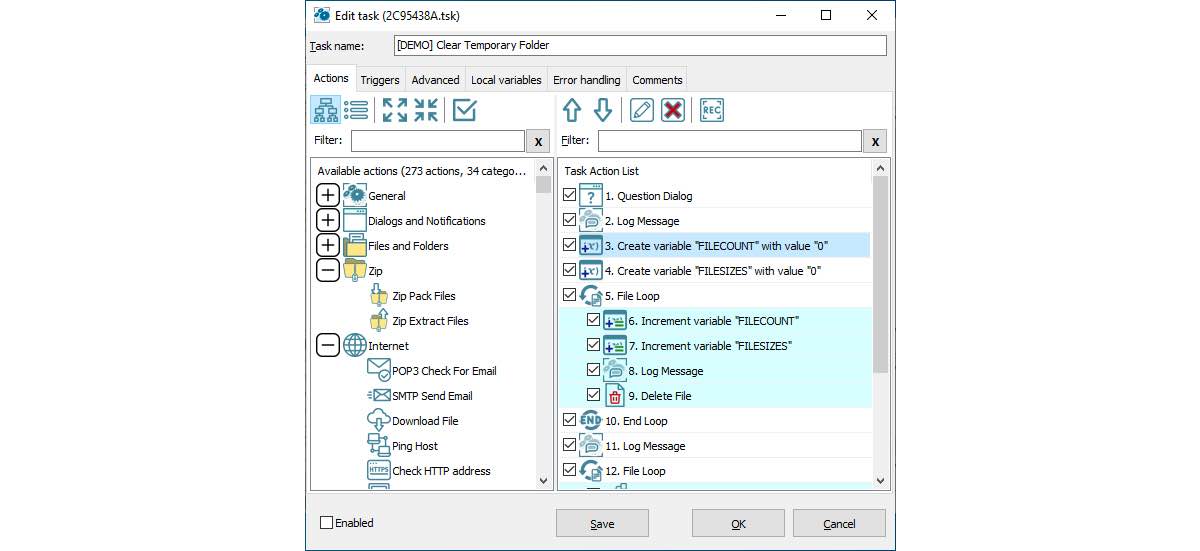
Task automation software is evolving at a remarkable pace, with new technologies and methodologies continuously reshaping how businesses operate. As organizations look to enhance efficiency and reduce costs, the future of task automation is set to be heavily influenced by next-generation technologies. The integration of artificial intelligence (AI) and machine learning (ML) stands out as pivotal, driving automation capabilities to new heights.
Innovations in task automation are not limited to just streamlining operations; they are redefining workflows and decision-making processes. By leveraging AI and ML, businesses can automate complex tasks that were previously thought to require human intervention. AI algorithms can analyze vast amounts of data and identify patterns, allowing for predictive automation—anticipating needs and executing actions without human oversight. This trend is particularly impactful in sectors like finance, where risk assessment and regulatory compliance can be automated, significantly reducing the margin for error.
Emerging Innovations in Task Automation
As we look ahead, several key innovations are shaping the landscape of task automation software. Understanding these trends is essential for businesses aiming to stay competitive:
- AI-Powered Automation: AI is transforming task automation by enabling systems to learn from data and adapt over time. This leads to smarter workflows and the ability to handle more complex tasks with minimal human input.
- Robotic Process Automation (RPA): RPA focuses on automating repetitive tasks using software robots. This technology allows organizations to deploy bots quickly to perform specific processes, enhancing efficiency and scalability.
- Natural Language Processing (NLP): NLP allows systems to understand and respond to human language, facilitating smoother interactions between users and automation tools. This innovation is streamlining customer service operations and data entry tasks.
- Integration with IoT Devices: The Internet of Things (IoT) is driving automation by connecting devices and systems, allowing for real-time data exchange and automated responses based on monitored conditions.
The long-term evolution of task automation is expected to further integrate AI and ML into everyday business operations across various industries. For instance, healthcare providers are increasingly using automation for patient management and predictive analytics, while retail businesses are utilizing AI to optimize inventory management and personalize customer experiences. As automation continues to advance, its role will expand, becoming essential for maintaining competitive advantage and operational excellence.
End of Discussion
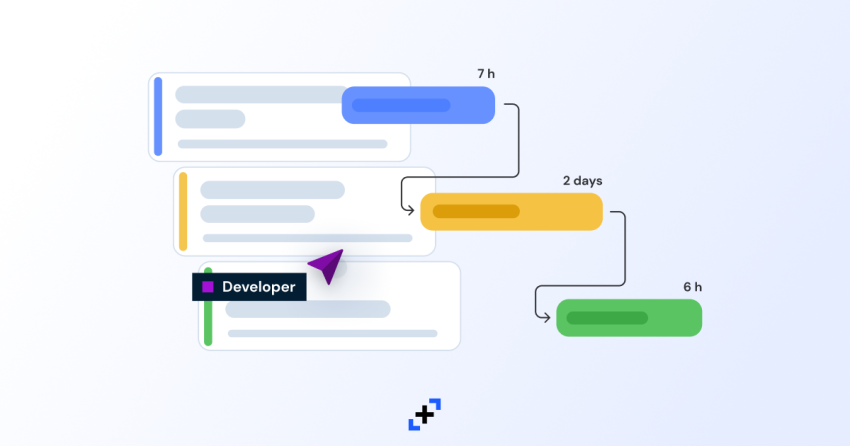
In conclusion, task automation software stands as a critical driver in the modern business environment, providing organizations with the tools needed to enhance performance and adapt to changing demands. As we look to the future, embracing these technologies will not only facilitate efficiency but also foster innovation across various sectors. Companies that invest in automation now are likely to reap the rewards for years to come.
FAQ Compilation
What is task automation software?
Task automation software is a tool designed to automate repetitive tasks, improving efficiency and accuracy in business operations.
How can task automation software improve employee satisfaction?
By automating mundane tasks, employees can focus on more meaningful work, leading to higher job satisfaction and engagement.
Is task automation software only for large enterprises?
No, task automation software is suitable for businesses of all sizes, offering scalable solutions tailored to specific needs.
What types of tasks can be automated?
Common tasks include data entry, email responses, report generation, and workflow management, among others.
Are there security risks associated with task automation software?
Yes, security risks exist, but they can be mitigated through proper implementation, regular updates, and adherence to best practices.