Digital planner stickers have become a popular tool for those looking to add a touch of creativity and organization to their planning routines. These versatile stickers not only brighten up digital planners but also serve to enhance productivity and streamline the planning process. By categorizing tasks, marking important dates, or simply adding a splash of color, digital planner stickers transform mundane lists into visually appealing layouts that inspire action and clarity.
From motivational quotes to seasonal themes, the variety of digital stickers available allows users to personalize their planning experience. This personalization fosters a deeper connection to their goals and tasks, making it more likely for individuals to stay engaged and focused on their plans. As we delve into the world of digital planner stickers, we’ll uncover how these small yet impactful elements play a significant role in not just organization but also self-expression.
Digital planner stickers and their role in organization
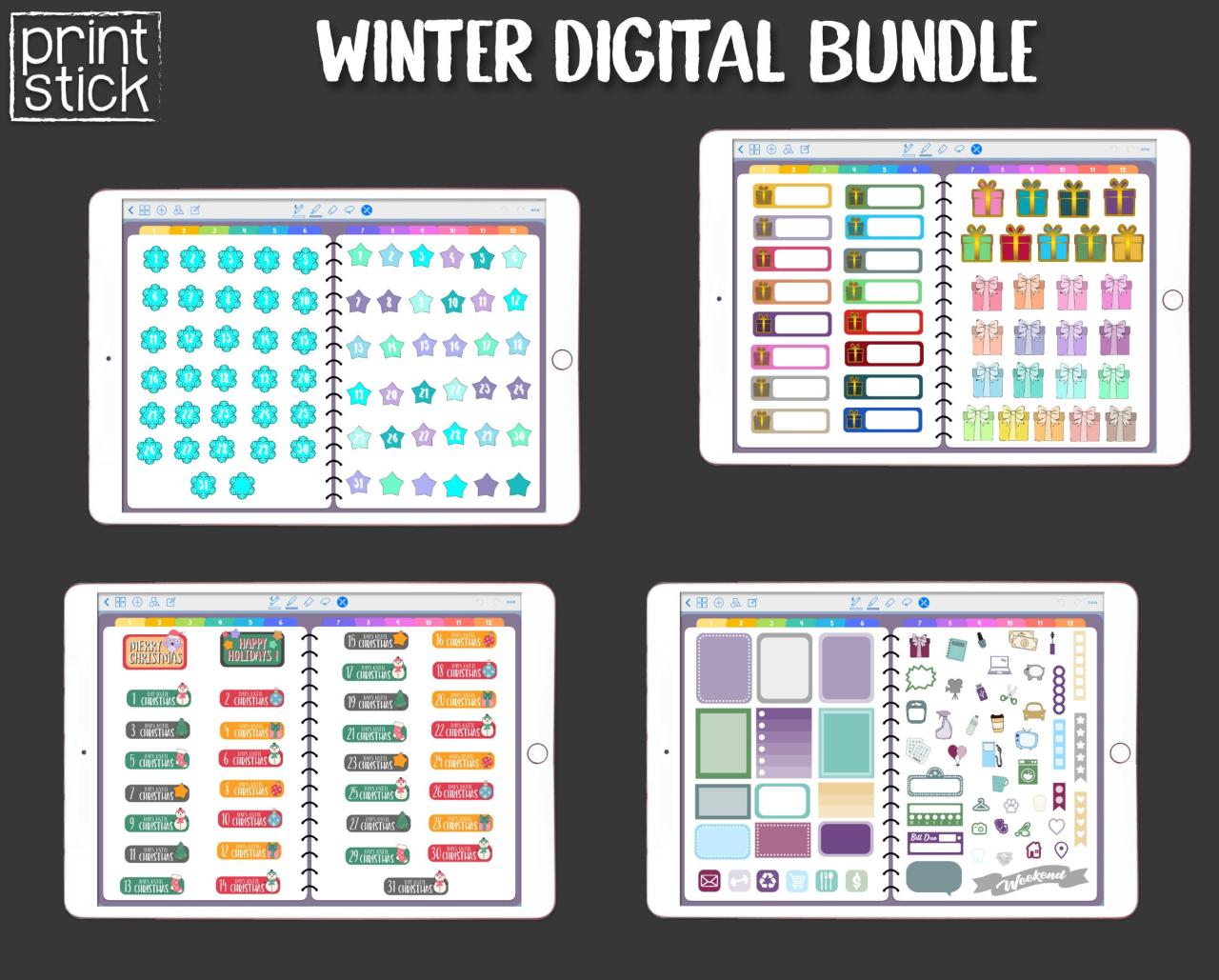
Digital planner stickers have emerged as a creative and functional tool in enhancing organization and productivity. These vibrant and customizable stickers are not just eye candy; they serve practical purposes that can significantly streamline the planning process. By incorporating digital stickers into planning routines, users can visually categorize tasks, set reminders, and enhance the overall aesthetics of their planners, making the process not only more organized but also enjoyable.
The transformation that digital planner stickers bring to the planning process is profound. When users adopt these digital embellishments, they can effectively break down their tasks into manageable pieces, using different stickers for various categories or priorities. For instance, color-coded stickers can highlight urgent tasks, while decorative stickers may denote special events or personal goals. This visual separation of tasks allows users to quickly scan their planners, leading to heightened awareness of upcoming deadlines and responsibilities. Moreover, the ability to easily resize and reposition stickers on digital platforms means that planners can be rearranged effortlessly as priorities shift.
Common types of digital planner stickers used for organization
Several types of digital planner stickers are commonly employed to boost organization and aid users in maintaining a structured schedule. Each type serves a specific function, catering to different aspects of planning.
To better understand the variety of digital planner stickers, here are some examples:
- Task Labels: These stickers are often used to tag specific tasks and can be color-coded for priority levels, making it easier to identify what needs immediate attention.
- Habit Trackers: Stickers designed to track daily habits, such as exercise or hydration, help users stay accountable and motivated.
- Event Markers: These are specially designed stickers to highlight significant dates like birthdays, anniversaries, or appointments, ensuring they don’t go overlooked.
- Inspirational Quotes: Adding motivational quotes can elevate the planner’s mood, encouraging positive thinking and self-reflection throughout the planning process.
- Reminder Icons: Simple icons for reminders, such as alarms or meetings, help users visually manage their schedules effectively without cluttering the planner’s layout.
The integration of these stickers into digital planners not only enhances organization but also encourages a more engaging and personalized planning experience, making routine tasks feel less burdensome.
The evolution of digital planner stickers over the years
Digital planner stickers have undergone significant transformations since their inception, becoming a prominent feature in the realm of digital organization. Initially, these stickers were simple, static images used primarily for embellishment in digital planners. Over time, with the rise of advanced technology and changing user preferences, they have evolved into dynamic, customizable elements that enhance productivity and engagement in digital planning.
The historical development of digital planner stickers reflects the broader trends in digital design and user interaction. Early stickers were often basic, focusing on functionality rather than aesthetics. However, as technology advanced, particularly with the introduction of tablets and stylus pens, designers began to incorporate more intricate designs and interactive features into their stickers. The ability to create animated stickers has further revolutionized the digital planner experience, allowing users to personalize their planners in ways that were previously impossible.
Technology’s Impact on Design and Usage
The influence of technology on the design and usage of digital planner stickers is profound. The advent of design software and apps has allowed creators to produce high-quality, versatile stickers that cater to a diverse array of user needs and preferences. As more people migrated to digital planning, developers began to understand the importance of user experience, leading to the introduction of features such as drag-and-drop functionality and easy resizing options.
With the proliferation of social media platforms, artists and designers can now showcase their digital stickers to a global audience. This visibility has led to a surge in popularity and demand, encouraging creators to explore various styles and themes. For instance, stickers reflecting current trends, such as minimalism or wellness, resonate well with users, showcasing how market dynamics influence design choices.
Additionally, the accessibility of digital planning tools has encouraged a wide demographic to engage in this practice, from students to busy professionals. The trend of personalization has also grown, with users increasingly seeking stickers that reflect their unique styles and preferences.
Key trends in the digital sticker market include a focus on sustainability, with many designers opting for eco-friendly practices, and the integration of mental health themes, promoting mindfulness and self-care. As users seek more than just decorative elements, they are leaning towards stickers that inspire organization and positivity in their daily lives.
It is evident that digital planner stickers are not just tools for decoration; they are integral to enhancing productivity and personal expression in the digital age.
Popular themes and designs for digital planner stickers
Digital planner stickers have become increasingly popular as tools for organization and personalization in the world of digital planning. With a variety of themes available, users can select stickers that resonate with their personal style or the current season. This versatility allows for a unique planning experience that can be tailored to individual needs and preferences.
Themes for digital planner stickers encompass a wide range of concepts, delivering both aesthetic appeal and functionality. Seasonal designs are especially popular, featuring motifs related to holidays such as Christmas, Halloween, and summer vacations. These stickers often include elements like snowflakes, pumpkins, and beach scenes, allowing users to celebrate the changing seasons visually.
Motivational stickers, on the other hand, focus on uplifting messages and affirmations that encourage productivity and positivity. Designs such as quotes in stylish typography or vibrant colors can inspire users to stay motivated throughout their planning process. Functional designs are also significant, providing users with stickers for tasks, reminders, and organization, such as flags, checklists, and icons that indicate important events.
Popular design styles and their appeal
The design style of digital planner stickers can greatly influence their appeal across different demographics. Each style resonates with unique preferences, often reflecting the personality and interests of the user. Below are some popular design styles and their associated demographics:
- Minimalist: Characterized by clean lines and simple shapes, this style appeals to individuals who prefer a more organized and clutter-free aesthetic. It tends to attract users in professional environments or those who appreciate a modern look.
- Whimsical: Featuring playful illustrations and vibrant colors, whimsical designs attract a younger audience or those who enjoy a fun, creative approach to planning.
- Vintage: Nostalgic elements, such as retro fonts and pastel colors, resonate with individuals who appreciate a classic aesthetic, often appealing to those who enjoy crafts or vintage culture.
- Boho: Incorporating earthy tones and natural elements, boho designs are popular among users who embrace a free-spirited lifestyle, often attracting a creative crowd interested in nature and self-expression.
- Geometric: With bold shapes and patterns, geometric designs cater to those who enjoy modern art and abstract aesthetics, appealing to users who appreciate structure and innovation.
Personalization plays a pivotal role in the selection of sticker themes. Users seek stickers that reflect their personal values, interests, and daily motivations. The ability to customize planners with stickers that carry personal significance makes the digital planning experience more engaging and enjoyable. For instance, a user may choose motivational stickers that resonate with their current goals or opt for seasonal stickers to celebrate specific occasions. Personalization allows each individual to curate a planning experience that feels uniquely theirs, fostering a sense of ownership and creativity in their daily routines.
In conclusion, the extensive variety of themes and designs available for digital planner stickers ensures that there is something for everyone. From seasonal to motivational to functional designs, the options are virtually limitless, catering to diverse preferences and lifestyles. This personalization allows users to create planners that not only serve their organizational needs but also reflect their unique identities.
Techniques for using digital planner stickers effectively
Digital planner stickers are not just embellishments; they are tools that can enhance organization, creativity, and productivity in digital planning. By understanding how to effectively integrate these stickers into your planning routine, you can create visually appealing layouts that keep you motivated and on track. This guide will Artikel various methods for using stickers effectively, layering techniques for visual appeal, and a step-by-step customization process within your digital planning app.
Methods for integrating stickers into digital planners
Integrating digital stickers into your planner can transform a basic layout into an engaging visual experience. Here are some methods to consider for different types of digital planners:
- Bullet Journals: Use stickers to denote tasks, events, and habits. Incorporating icons for each category can help you quickly identify important information at a glance.
- Calendar Planners: Color-code events using stickers to distinguish between personal, work, and social engagements. This makes your calendar not only functional but aesthetically pleasing.
- Goal Trackers: Stickers can serve as motivational reminders. For instance, using star stickers for completed tasks can create a sense of achievement and encourage continued progress.
Best practices for layering and combining stickers
Layering and combining stickers effectively can significantly enhance the visual appeal of your planner. Here are some best practices to keep in mind:
1. Choose a Color Palette: Select a cohesive color scheme that complements your planner’s overall design. This helps in creating a harmonious layout.
2. Use Transparency: Layering stickers with varying levels of transparency can add depth. For example, placing a semi-transparent floral sticker behind a bold title can create an attractive focal point.
3. Balance Visual Weight: When combining stickers, ensure that heavier elements (like larger graphics) are balanced with lighter elements (like small icons or text). This prevents your planner from feeling cluttered or chaotic.
4. Create Sections: Use larger stickers as headers or dividers to establish clear sections within your planner. This can help to organize thoughts and tasks more effectively.
5. Play with Shapes: Combine geometric shapes with decorative stickers to achieve a modern look. A round sticker can be layered atop a square one to create visual interest.
“Layering stickers not only enhances aesthetics but also improves functionality, making your planner a true reflection of your style.”
Step-by-step guide on customizing stickers
Customizing stickers in your digital planning app can personalize your experience. Here’s a simple guide to follow:
1. Open Your Planning App: Launch the app where you have your digital planner set up.
2. Select a Sticker: Choose the sticker you want to customize from your library or stickers pack.
3. Adjust Size: Tap on the sticker to resize it according to your preference. Most apps allow you to pinch to zoom or drag corners to adjust.
4. Use Color Options: If the app provides a color palette, select new colors to match your theme or mood for the week.
5. Add Text: Some apps let you overlay text on stickers. Use this feature to label stickers for better context (e.g., “Birthday Party” on a cake sticker).
6. Layering Stickers: Position your customized sticker onto your planner page. Experiment with layering it on other elements to see what looks best.
By following these techniques and practices, your digital planner will not only be a functional tool but also a beautiful reflection of your personal style.
The benefits of creating your own digital planner stickers
Creating your own digital planner stickers offers an array of advantages, turning a simple organizational tool into a personal expression of creativity. While pre-made stickers may be convenient, they often lack the unique touch that customized designs can provide. When you craft your own stickers, you have the freedom to choose colors, themes, and designs that resonate with your personal style, ensuring that your planner reflects your individuality. This personalized approach not only enhances your planning experience but also makes it more enjoyable and engaging.
Designing custom digital planner stickers can significantly enhance creativity and personal expression. By engaging in the sticker creation process, you’re not just following a template; you’re creating meaningful art that tells your story. This creative endeavor allows you to explore various design elements, such as typography, color palettes, and illustrations, which can lead to a deeper understanding of your aesthetic preferences. The act of designing can be therapeutic, providing a productive outlet for emotions and ideas.
Furthermore, the iterative process of creating stickers can inspire innovation, leading to new ideas that might be implemented in other artistic projects. As you experiment with different designs, you may discover new techniques or styles that could evolve your overall artistic skill set. The ability to tailor stickers for specific occasions or moods also allows for a dynamic planning experience, where each sticker can evoke particular emotions or memories, adding layers of significance to your planning.
Recommended software and tools for sticker design
Selecting the right software for designing stickers is crucial to achieving the desired outcome. Various tools offer different features that can enhance your design process. Here are some popular options along with their key attributes:
- Procreate: A powerful app for iPad users, Procreate provides a wide range of brushes and tools that facilitate detailed illustrations. Its intuitive interface makes it easy to experiment with layers and color blending.
- Adobe Illustrator: Known for its scalability and precision, this vector graphics software is ideal for creating high-quality stickers. Its extensive tools can cater to professional designers, though it may have a steeper learning curve.
- Canva: User-friendly and accessible, Canva is great for beginners. It offers pre-set templates and drag-and-drop functionality, allowing for quick designs without the need for advanced skills.
- Affinity Designer: As a more affordable alternative to Adobe Illustrator, Affinity Designer offers robust vector design capabilities. It’s suitable for both beginners and seasoned designers looking for professional-grade tools.
“Creating your own stickers not only personalizes your planner but also fosters a deeper connection to your organizational practices.”
Each of these tools caters to different skill levels and design needs, making it easier for anyone to start their journey into digital sticker creation. Whether you aim for intricate designs or simple, fun illustrations, the right software can elevate your creative process and bring your unique vision to life.
The impact of digital planner stickers on mental health and well-being
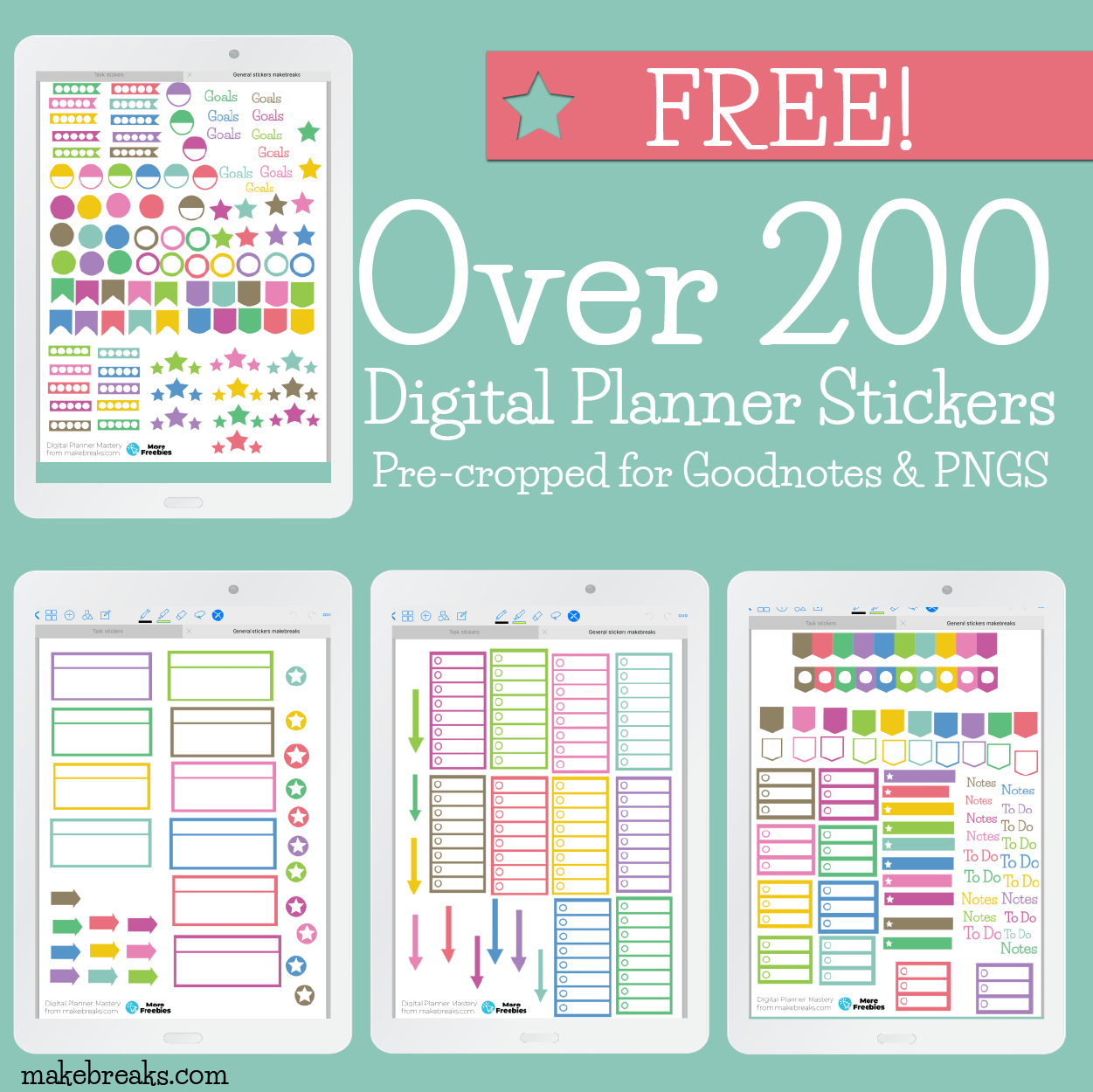
The integration of digital planner stickers into everyday planning routines has gained prominence as a tool for enhancing mental health and promoting overall well-being. These stickers serve not only as decorative elements but also play a vital role in fostering a sense of organization and clarity. The act of visually enhancing daily tasks can lead to a more structured approach to life, positively influencing mental states.
The psychological benefits of using digital planner stickers extend far beyond aesthetics. They can significantly contribute to mental clarity and stress reduction. Engaging with a planner that features colorful and appealing stickers can stimulate the brain’s reward system. This leads to increased motivation and satisfaction when completing tasks. Visually appealing planners help individuals to break down overwhelming responsibilities into manageable chunks, making it easier to prioritize and stay focused. Research in psychology indicates that visual organization aids cognitive processing, allowing individuals to absorb information more efficiently and reduce feelings of anxiety related to disorganization.
Positive effects and personal experiences
Many users of digital planner stickers share inspiring anecdotes that highlight the transformative impact of these tools on their daily lives.
One individual shared, “Since I started using digital stickers, I’ve noticed a significant decrease in my anxiety levels. The vibrant colors and fun designs make planning feel less like a chore and more like a creative outlet. I actually look forward to organizing my week!”
Another user recounted how their productivity soared after incorporating stickers: “Before, my planner was just plain and felt monotonous. Adding stickers has turned it into a personalized masterpiece, which motivates me to stay on track. I even find myself completing tasks quicker just to add more stickers!”
Moreover, studies suggest that enhancing planning habits through visual stimulation can lead to improved mood and a greater sense of control over one’s life. The act of decorating planners allows for self-expression, making the planning process enjoyable and rewarding. Users often report feeling a sense of accomplishment not just from completing tasks, but also from creating a visually appealing representation of their lives.
In summary, digital planner stickers are more than just decorative elements; they are powerful tools that can enhance mental health, reduce stress, and foster a sense of accomplishment.
Future trends in digital planner stickers
The digital planner sticker industry is poised for exciting developments in the coming years. With constant advancements in technology and user preferences evolving, these stickers are more than just decorative elements; they are set to become integral tools for productivity and organization. As the landscape of digital planning continues to expand, certain trends are emerging that will shape the future of digital planner stickers and their functionalities.
Impact of User Feedback on Design and Functionality
User feedback plays a critical role in influencing the design and functionality of digital planner stickers. As creators gather insights from users, they can make informed decisions that align with the preferences and needs of their audience. This interaction fosters a community-driven approach to development, ensuring that new features resonate with actual users. The integration of feedback can lead to innovations such as customizable stickers, enhanced usability on different devices, and better integration with various planning apps.
Communities of digital planner enthusiasts often share their experiences and suggestions through platforms such as social media and dedicated forums. This collective input can be categorized into several important trends that will likely dictate future designs:
- Customization Options: Users are increasingly seeking personalized stickers that reflect their unique style and needs, prompting designers to offer more customizable features.
- Interactive Elements: Stickers with interactive functionalities, such as check-off boxes or reminders, enhance user engagement and planning efficiency.
- Cross-Platform Compatibility: As more users switch between devices, stickers that seamlessly function across different systems will become essential.
- Integration with Other Tools: The ability for stickers to work together with productivity apps or calendar features will create a more cohesive planning experience.
The future of digital planner stickers will also be shaped by emerging technologies. For instance, augmented reality (AR) could provide users with new ways to visualize their planning experiences, making stickers come alive in their physical environments. Additionally, the rise of artificial intelligence (AI) could lead to recommendations for stickers based on users’ past behavior and preferences. These advancements reflect a broader shift toward personalization and enhanced user experience in the digital planning realm. By staying attuned to user feedback and technological innovations, the digital planner sticker industry is set to evolve and thrive, ultimately transforming how individuals organize their lives.
Final Summary
In summary, digital planner stickers are more than just decorative elements; they are a powerful tool for enhancing organization, creativity, and mental well-being. As we’ve explored their evolution, themes, techniques, and future trends, it’s clear that these stickers are poised to continue shaping how we plan and express ourselves. By integrating digital planner stickers into our daily routines, we pave the way for a more organized, productive, and enjoyable planning experience.
FAQ Explained
What are digital planner stickers?
Digital planner stickers are graphics used within digital planning applications to enhance visual organization and personalize planning layouts.
Can I create my own digital planner stickers?
Yes, many tools and software programs allow users to design custom digital planner stickers tailored to their preferences.
Where can I find digital planner stickers?
Digital planner stickers can be found on various online marketplaces, design websites, and digital planning communities.
Are digital planner stickers suitable for all types of planners?
Yes, digital planner stickers can be used across various digital planning platforms, enhancing both functional and aesthetic elements.
Do digital planner stickers improve productivity?
Yes, by enhancing organization and making planning enjoyable, digital planner stickers can positively influence productivity levels.