
 Matthew David
Time management software has become a vital tool in today’s fast-paced work environments, offering solutions that help individuals and teams make the most of their hours. As our professional lives become increasingly complex, having the right tools to track and manage time effectively is essential for maintaining productivity and achieving goals.
This software not only aids in scheduling tasks but also provides insights that can streamline workflows and enhance efficiency across various business operations. By integrating key functionalities such as time tracking, shared calendars, and real-time reporting, time management software empowers professionals to optimize their work habits and foster better team collaboration.
The Importance of Time Management Software in Modern Work Environments
In an age characterized by rapid technological advancement and increasing demands on productivity, time management software has become a vital tool for businesses and employees alike. As work environments evolve, the need for efficient time tracking, task management, and resource allocation has never been more critical. This software not only helps individuals manage their schedules but also enhances collaboration among teams, fostering a more productive workplace.
Effective time management is increasingly linked to enhanced productivity and efficiency. Studies have shown that organizations utilizing time management software can see productivity increases of up to 30%, primarily due to better task prioritization and streamlined workflows. Employees are empowered to allocate their time more effectively, reducing procrastination and enhancing focus. By providing clear visibility into task deadlines and project timelines, these tools help mitigate the risk of burnout and stress, leading to healthier work environments and improved employee satisfaction.
Key Features of Time Management Software
When evaluating time management software, it’s essential to consider the features that contribute to its effectiveness in the workplace. The following key features are commonly recognized as beneficial for businesses:
- Task Scheduling: This feature allows users to allocate specific time slots for various tasks, ensuring that deadlines are met and prioritizing work effectively. It aids in visualizing daily, weekly, or monthly goals.
- Time Tracking: Automated time tracking helps users monitor how much time is spent on different tasks, providing insights into productivity patterns and areas for improvement. It can also assist in billing clients accurately.
- Collaboration Tools: Many time management software solutions include features that facilitate team collaboration, such as shared calendars, project boards, and communication platforms, which enhance coordination among team members.
- Reporting and Analytics: Detailed reports and analytics help businesses assess productivity levels, identify bottlenecks, and make informed decisions based on data. This allows for strategic planning and resource optimization.
- Integration Capabilities: The ability to integrate with other software solutions—like email clients, project management tools, and calendars—ensures a seamless workflow and enhances the overall functionality of the time management tool.
Time management software is not just about tracking time; it’s about empowering teams to work smarter, not harder.
Key Features to Look for in Time Management Software
Effective time management software can significantly enhance productivity and ensure that tasks are completed efficiently. When assessing various time management solutions, it’s essential to identify must-have features that facilitate seamless workflow, task tracking, and collaboration. With the right tools, users can optimize their time and make informed decisions about their schedules.
One of the primary features to look for in time management software is robust task management capabilities. This includes options for creating, assigning, and prioritizing tasks to streamline project workflows. Additionally, time tracking functionality is critical, allowing users to monitor how long they spend on individual tasks and overall projects. This feature not only provides insights into productivity levels but also assists in accurate billing for freelance or contractual work.
Unique Capabilities of Different Software Tools
When comparing various time management software, it’s essential to look at their unique capabilities. Below are key features offered by some popular tools:
- Asana: Offers excellent project visualization tools like Kanban boards and timelines, making it easy for teams to see real-time progress.
- Trello: Known for its simplicity, Trello utilizes boards and cards for task management, which is ideal for smaller teams or personal projects.
- ClickUp: Combines task management with goal tracking capabilities, enabling users to set objectives and monitor progress easily.
- Todoist: Features a minimalist interface and powerful task categorization, making it user-friendly for individual users.
Each tool has its strengths, catering to different user needs—from simple task tracking to complex project management.
Integrations with other tools enhance the functionality of time management software significantly. Many of these applications offer the ability to connect with scheduling, calendar, and communication platforms. For instance, integrating with Google Calendar can help synchronize deadlines and reminders, ensuring that users never miss important dates. Additionally, tools like Slack can be used for team communication and updates, which streamline collaboration and reduce the need for constant status meetings.
“Integrating time management software with other productivity tools can create a cohesive ecosystem that maximizes efficiency.”
By leveraging these integrations, users can create a comprehensive workflow that reduces friction and enhances overall productivity. The combination of specialized features and seamless integration capabilities ultimately shapes the effectiveness of time management solutions.
The Role of Time Tracking in Time Management Software
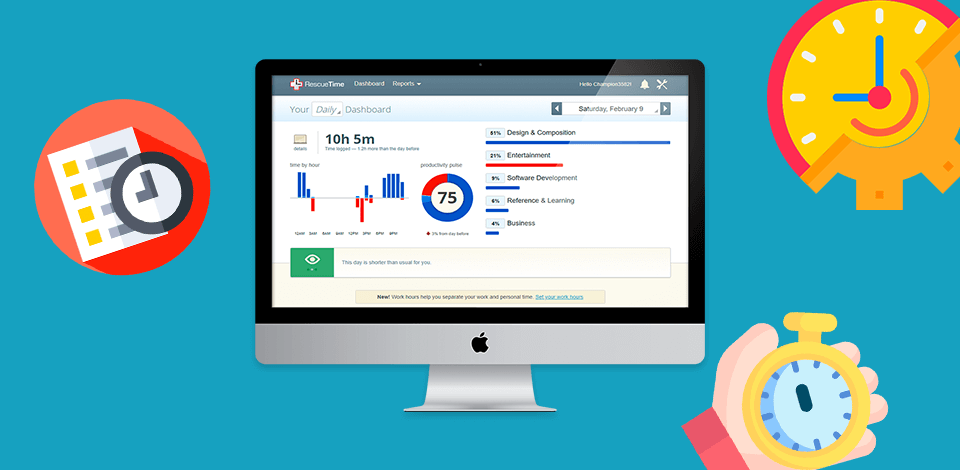
Time tracking functionalities play a crucial role in enhancing time management within organizations. By providing precise data on how time is allocated across various tasks and projects, businesses can identify inefficiencies, prioritize activities, and ultimately improve productivity. Effective time tracking allows individuals and teams to have a clearer understanding of their work habits, enabling them to make informed decisions regarding their schedules and workload.
Through time tracking, businesses can gain insights into where time is being spent, which can lead to more effective resource allocation. For example, a marketing agency might use time tracking software to monitor how much time is dedicated to different clients or campaigns. By analyzing this data, the agency can determine if certain projects are taking more time than anticipated, prompting a review of the processes involved. This insight allows for the optimization of workflows and can lead to reduced costs and improved client satisfaction.
Utilization of Time Tracking in Businesses
Time tracking not only helps in identifying areas for improvement but also fosters accountability among team members. Here are several ways businesses are leveraging time tracking to optimize their processes:
- Project Management: Companies like Trello and Asana integrate time tracking to help teams understand the time spent on specific tasks, leading to better project planning and time estimation for future projects.
- Billing and Invoicing: Freelancers and service-based businesses use time tracking to accurately bill clients based on the hours worked, ensuring fair compensation for their efforts.
- Performance Evaluation: Organizations use time tracking metrics to assess employee productivity and performance, enabling them to identify high performers and those who may need additional support or training.
- Resource Allocation: By analyzing time spent on various activities, businesses can reallocate resources to projects that yield the best return on investment, effectively maximizing their operational efficiency.
Real-time reporting is a significant feature of time tracking that enhances accountability and transparency within teams. When employees can see live updates of their time allocation, they are more likely to stay focused and adhere to deadlines. This transparency fosters a culture of trust, as team members can easily track their contributions and progress in real time, enabling managers to make data-driven decisions regarding workload distribution.
“Real-time reporting not only improves accountability but also motivates team members to manage their time effectively.”
How Time Management Software Enhances Team Collaboration
Time management software plays a pivotal role in fostering collaboration among team members by providing a centralized platform for organizing tasks, schedules, and communication. In today’s fast-paced work environment, effective collaboration is essential for productivity, and time management tools are designed to streamline interactions and improve workflow.
The collaborative features of time management software facilitate seamless communication and coordination among team members. These tools often include chat functions, file sharing, and real-time updates, which help keep everyone in the loop. For instance, platforms like Asana and Trello allow users to comment directly on tasks, enabling quick exchanges of ideas and feedback without the need for lengthy email threads. This instant communication fosters a culture of transparency and accountability, as team members are more likely to stay engaged and informed on project developments.
Shared Calendars and Task Assignments in Project Management
Shared calendars are a cornerstone of effective project management within time management software. By synchronizing schedules, team members can easily identify available time slots for meetings, ensuring that everyone is on the same page. This not only reduces the back-and-forth communication typically associated with scheduling but also helps in planning collaborative sessions efficiently. With shared calendars, deadlines are visible to all, prompting team members to be proactive in managing their time.
Moreover, task assignments within these platforms enhance clarity and responsibility. Each team member knows their specific roles and deadlines, which minimizes confusion over who is accountable for what. For example, software like Microsoft Teams allows project leaders to assign tasks with detailed instructions and due dates. This transparency not only improves accountability but also empowers team members to manage their workloads effectively.
In summary, the collaborative features of time management software—such as integrated communication tools and shared resources—substantially bolster team collaboration. The ability to share calendars and assign tasks creates an organized environment where project management becomes simpler and more efficient. By utilizing these tools, teams can achieve higher levels of productivity and maintain a cohesive workflow, ultimately leading to successful project outcomes.
The Relationship Between Time Management Software and Work-Life Balance

Effective time management is crucial for maintaining a healthy work-life balance, particularly in today’s fast-paced world where the boundaries between professional and personal lives often blur. Time management software plays a pivotal role in helping individuals allocate their time wisely, allowing them to fulfill their work commitments while still preserving time for personal pursuits and self-care. By streamlining tasks, scheduling, and prioritization, these tools empower users to take control of their time, leading to a more balanced life.
Time management software offers various features that specifically cater to personal time management and overall well-being. For instance, many applications include calendar integrations that allow users to visualize their commitments at a glance, helping to prevent over-scheduling. Task lists with prioritization options enable users to focus on high-impact activities, while reminders and alerts ensure that important deadlines are met without last-minute stress. Furthermore, features like time tracking can provide valuable insights into how time is being spent, allowing users to identify areas where adjustments may be needed.
Key Features Supporting Personal Time Management
The following features are essential for enhancing personal time management and promoting well-being:
- Customizable Task Lists: Users can create tailored lists that align with personal and professional goals, ensuring clarity in what needs to be accomplished.
- Time Blocking: This technique allows users to allocate specific time slots for different activities, fostering focused work sessions and dedicated personal time.
- Progress Tracking: Visual indicators of task completion motivate individuals and help track their performance over time, giving a sense of accomplishment.
- Integration with Other Tools: Many time management tools can sync with other applications, allowing for a cohesive approach to managing work and personal life.
- Wellness Reminders: Features that prompt users to take breaks or engage in self-care activities can significantly enhance mental health and prevent burnout.
Several testimonials illustrate the positive effects of time management software on work-life balance. For example, Sarah, a project manager, shared how implementing a time management app allowed her to complete her tasks efficiently during work hours, ultimately giving her the freedom to pursue her passion for painting in the evenings. Similarly, John, a remote worker, discovered that by utilizing time tracking features, he could better understand his productivity patterns, leading him to more effectively prioritize family time on weekends.
In essence, the relationship between time management software and work-life balance is symbiotic; as individuals learn to manage their time effectively, they can enjoy richer personal lives while thriving professionally.
The Future of Time Management Software and Emerging Trends
In an era where productivity is paramount, time management software is evolving to meet the dynamic needs of users. As businesses and individuals strive for greater efficiency, the software landscape is seeing substantial enhancements driven by technology and user feedback. This evolution not only reflects current demands but also anticipates future requirements, ensuring that time management tools remain relevant and effective.
The current trends shaping the future of time management tools include increased integration with other applications and platforms, the rise of remote work, and a focus on user-centered design. As remote work becomes the norm, time management software is adapting to facilitate collaboration across different time zones and locations. Additionally, the integration of project management, communication tools, and calendars into a single platform is critical, streamlining workflows and reducing the need to switch between applications, which can disrupt focus and productivity.
Advancements in AI and Machine Learning
The influence of artificial intelligence (AI) and machine learning on time management software is profound, bringing about a shift in how users interact with these tools. AI algorithms can analyze user habits and suggest optimal scheduling, allowing for a more personalized experience. For instance, AI-driven features can automatically prioritize tasks based on deadlines and user behavior, significantly enhancing productivity.
Machine learning also enables software to improve over time, adapting to user preferences and identifying patterns that can lead to better time allocation. For example, tools like Trello and Asana are beginning to implement AI that predicts project completion times based on historical data, providing users with more accurate planning capabilities.
Predictions from industry experts suggest that the next wave of features in time management software will include more sophisticated virtual assistants, enhanced automation of mundane tasks, and predictive analytics to forecast potential bottlenecks in workflows. As these features become commonplace, users will likely benefit from a more seamless and intuitive experience, enabling them to focus more on their core tasks rather than on the logistics of time management.
In summary, the future of time management software is bright, driven by technological advancements that promise to make these tools smarter, more efficient, and tailored to individual needs. As these trends continue to evolve, users can expect a more integrated and supportive approach to managing their time effectively.
Final Review
In conclusion, the role of time management software cannot be overstated, as it significantly impacts productivity, ensures better work-life balance, and fosters team collaboration. As we move forward, embracing these tools will be essential for navigating the demands of modern work life and adapting to emerging technological trends in the industry.
Questions Often Asked
What types of businesses can benefit from time management software?
All types of businesses, from startups to established corporations, can benefit by improving efficiency and streamlining processes.
Is time management software easy to use for beginners?
Most time management software is designed with user-friendly interfaces, making it accessible even for beginners.
Can time management software be integrated with other tools?
Yes, many solutions offer integration with popular tools like project management software, calendars, and communication apps.
How can time management software improve team communication?
It allows team members to assign tasks, share calendars, and update progress in real-time, enhancing overall communication.
What are some common features of time management software?
Key features typically include time tracking, task management, reporting, and collaboration tools.