
 Matthew David
Time tracking software is becoming essential in today’s fast-paced work environment. By accurately monitoring how much time is spent on tasks, organizations can significantly boost productivity, streamline project management, and meet deadlines more effectively. This software is not only beneficial for freelancers and remote teams but is also invaluable in industries such as IT, consulting, and creative services, where time management directly influences profitability and client satisfaction.
As companies embrace remote work models, the role of time tracking software becomes even more critical. It helps maintain accountability among team members and ensures transparency in project timelines. This overview explores the key features, pricing models, implementation strategies, and compliance considerations of time tracking solutions, providing a comprehensive understanding of how these tools can enhance operational efficiency.
Understanding the Importance of Time Tracking Software
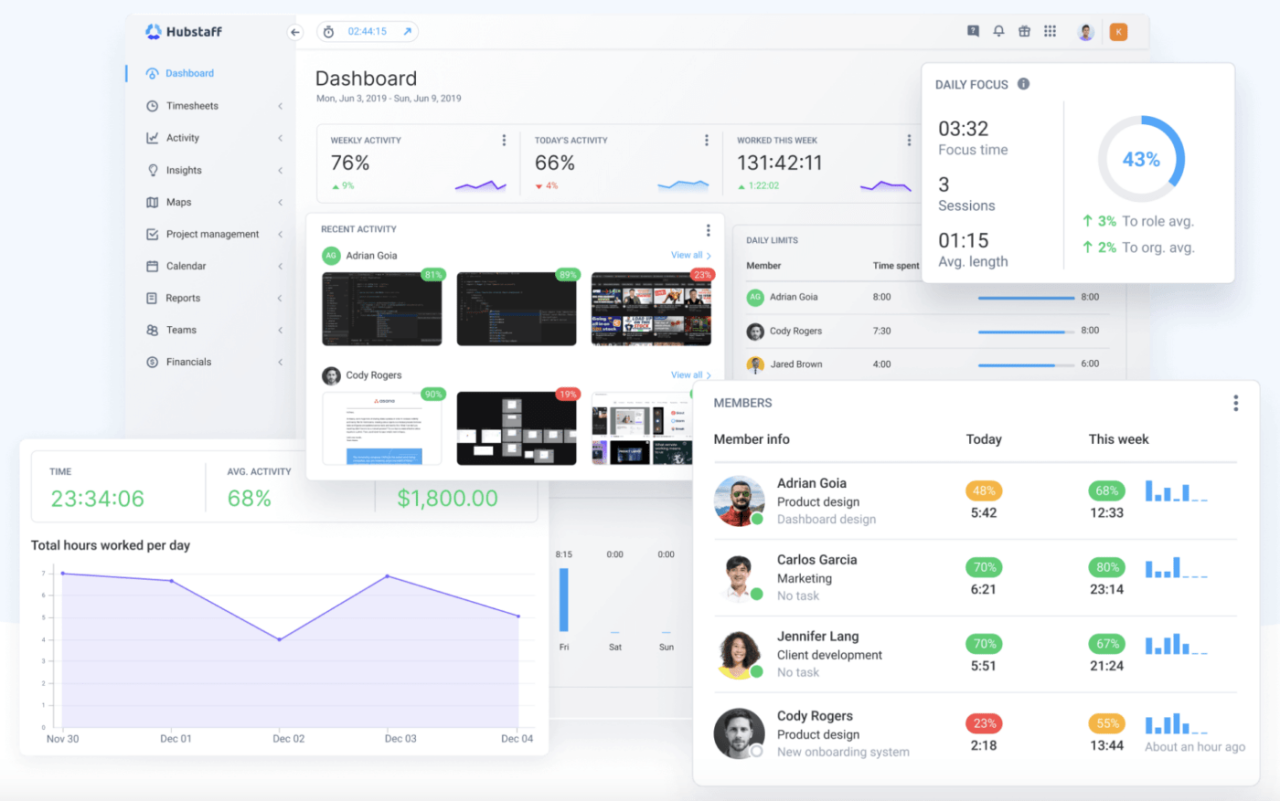
Time tracking software is a vital tool for enhancing workplace productivity, helping teams and individuals make the most of their working hours. By accurately logging time spent on various tasks and projects, organizations gain valuable insights into their workflows, enabling them to identify areas for improvement. The implementation of time tracking tools fosters accountability, encourages better time management, and ultimately leads to higher efficiency and output in any work environment.
The use of time tracking software significantly impacts project management and deadlines. With precise time data, project managers can effectively allocate resources, estimate project timelines more accurately, and monitor progress in real-time. This visibility helps in identifying bottlenecks early, ensuring that projects remain on track and deadlines are met. For instance, a software development team using time tracking can analyze how long specific tasks take, allowing them to refine their estimates for future projects and improve sprint planning. Accurate time tracking also aids in client billing, ensuring that clients are charged fairly based on actual time spent on their projects.
Various industries benefit immensely from time tracking software, optimizing their operations and enhancing productivity. Here are a few notable examples:
Industries Benefiting from Time Tracking Software
Many sectors rely on time tracking to streamline processes and improve outcomes. The following industries have found significant advantages in utilizing these tools:
- IT and Software Development: Teams can track hours spent on coding, debugging, and meetings, facilitating agile project management.
- Consulting Services: Consultants can bill clients accurately based on tracked hours while providing transparency in their work.
- Marketing Agencies: Time tracking helps agencies monitor campaign workloads and allocate resources efficiently to avoid overworking staff.
- Construction: Accurate time logs assist project managers in assessing labor costs and ensuring timely project completion.
- Freelancers: Independent workers track billable hours, ensuring they get paid fairly for the time invested in their projects.
“With time tracking software, organizations can transform how they manage time, leading to enhanced productivity and better project outcomes.”
Key Features of Effective Time Tracking Software
Effective time tracking software plays a crucial role in enhancing productivity, managing resources efficiently, and ensuring accurate billing in various business environments. The best tools not only track hours worked but also provide insights into how time is allocated across different tasks and projects, enabling users to make informed decisions.
A well-designed time tracking solution encompasses several key features that enhance its usability and effectiveness in real-world applications. Here are five essential features that define effective time tracking software:
Essential Features of Time Tracking Software
These features help organizations optimize their productivity and streamline workflows:
- Automated Time Tracking: This feature allows the software to automatically track the time spent on various activities without requiring manual input. It reduces the risk of human error and ensures more accurate data collection.
- Comprehensive Reporting: Effective time tracking software provides detailed reports that analyze time usage across different projects, tasks, or employees. This helps in identifying bottlenecks and improving productivity.
- User-Friendly Interface: A simple and intuitive interface enhances user adoption and minimizes training time. Users should be able to navigate the software easily, making time tracking a seamless part of their workflow.
- Integration with Other Tools: The ability to integrate with project management, accounting, or payroll systems ensures that time data flows smoothly across various platforms, enhancing overall operational efficiency.
- Mobile Accessibility: With the rise of remote work, having a mobile app or responsive design allows users to track time from anywhere, ensuring that hours worked are accurately recorded regardless of location.
Comparison of Automated Tracking versus Manual Entry
Comparing automated tracking to manual entry methods shows distinct advantages for modern workplaces. Automated tracking significantly reduces the time spent logging hours and minimizes inaccuracies associated with manual entry. It can also provide real-time insights into productivity patterns, helping teams make adjustments as needed. In contrast, manual entry often relies on user discipline and memory, leading to potential discrepancies and lost billable hours.
Automated tracking captures time across different applications and tasks in the background, while manual entry requires users to actively log their time, often resulting in lost productivity. The choice between these methods can greatly influence the efficiency of time tracking efforts.
Comparison Table of Time Tracking Software Tools
The following table compares various time tracking software tools based on their features and usability, providing insight into which tool may best fit different business needs:
| Software Tool | Automated Tracking | Comprehensive Reporting | User-Friendly Interface | Mobile Accessibility |
|---|---|---|---|---|
| Tool A | Yes | Yes | Yes | Yes |
| Tool B | No | Yes | Yes | No |
| Tool C | Yes | No | No | Yes |
| Tool D | Yes | Yes | Yes | Yes |
The Role of Time Tracking Software in Remote Work Environments
In today’s increasingly digital workspace, remote teams are becoming the norm rather than the exception. Time tracking software plays a crucial role in these environments, ensuring accountability and transparency among team members. By facilitating a culture of productivity and trust, these tools enable organizations to maintain oversight without micromanaging.
Time tracking software helps remote teams stay on the same page, allowing managers to monitor progress, allocate resources effectively, and assess team performance. This not only builds accountability but also fosters a team culture where everyone is aware of their contributions towards collective goals. With real-time data on hours worked and tasks completed, the entire remote workflow becomes clearer, which can ultimately lead to increased productivity.
Integration of Time Tracking Software into Remote Workflows
Effective integration of time tracking software into remote team workflows can streamline processes and enhance collaboration. Here are several methods for ensuring a smooth transition:
- Choose the Right Software: Selecting a user-friendly time tracking tool that fits the team’s needs is critical. Look for features like reporting, invoicing, and integrations with other collaboration tools.
- Set Clear Expectations: Clearly communicate the purpose and benefits of time tracking to team members. Artikel how the data will be used to support individual and collective performance.
- Provide Training: Offering training sessions on how to use the time tracking software will increase adoption rates and reduce any potential frustration among team members.
- Encourage Regular Use: Foster a culture where regular time tracking is normalized. Remind employees to update their time logs consistently to ensure accurate data capture.
- Integrate with Project Management Tools: Many time tracking software options can integrate with existing project management tools, making it easier for teams to track time within their usual workflow.
The adoption of these methods ensures that the time tracking software becomes an integral part of the remote work culture, enhancing productivity and accountability.
Challenges and Solutions in Implementing Time Tracking
Implementing time tracking software for remote workers can present several challenges that organizations need to address. Understanding these common obstacles and their solutions is key to successful implementation.
- Resistance to Change: Some team members may resist using time tracking software due to concerns over privacy or micromanagement. To address this, it’s important to frame time tracking as a tool for empowerment rather than surveillance.
- Technical Issues: Technical difficulties can hinder the effective use of time tracking tools. Regularly update software, provide technical support, and ensure all team members have access to necessary resources.
- Lack of Engagement: Employees might not actively engage with the time tracking system. Encourage participation by sharing insights and how time tracking data can lead to personal and team improvements.
- Inconsistent Logging: Inconsistencies in logging time can lead to inaccurate data. Implement reminders and regular check-ins to help maintain accuracy and encourage accountability.
Addressing these challenges head-on can promote a culture of transparency and cooperation, ultimately leading to a more productive remote work environment.
Exploring Different Pricing Models for Time Tracking Software
Time tracking software has become essential for businesses looking to optimize productivity and manage resources effectively. As companies consider integrating these tools, understanding the various pricing models available is crucial. This overview will shed light on subscription-based models, one-time purchases, and the implications of choosing free versus paid solutions.
Different pricing models for time tracking software cater to a range of business needs and budgets. The most common models include subscription-based pricing and one-time purchases. Subscription-based models typically charge users on a monthly or annual basis, providing ongoing updates and support. In contrast, one-time purchase models involve a single payment for lifetime access, often accompanied by limited updates.
Comparison of Pricing Models
When evaluating time tracking software, it’s important to weigh the pros and cons of free versus paid solutions, especially considering the size of the business. Below is a breakdown of the two categories:
- Free Time Tracking Solutions:
- Pros:
Cost-effective for startups and small businesses.
Features basic time tracking capabilities without financial commitment.
- Cons:
Limited features and support.
Often lacks advanced functionality such as reporting and integrations.
- Pros:
- Paid Time Tracking Solutions:
- Pros:
Comprehensive features and support.
Typically includes advanced reporting, integrations, and customer service.
- Cons:
Ongoing costs can accumulate.
May not be feasible for very small businesses with tight budgets.
- Pros:
The choice between free and paid options ultimately depends on the business size and its specific needs. For larger organizations, investing in robust paid solutions often yields better returns through enhanced productivity and efficiency.
Pricing Structures of Popular Time Tracking Tools
To provide clarity on the varying costs associated with time tracking software, the following table Artikels the pricing structures of several well-known tools:
| Tool Name | Pricing Model | Cost | Key Features |
|---|---|---|---|
| Toggl Track | Subscription | $10/user/month | Time tracking, reporting, project management integration. |
| Harvest | Subscription | $12/user/month | Invoicing, expense tracking, team collaboration. |
| Clockify | Free/Paid | Free basic plan; $9.99/user/month for premium features. | Time tracking, reporting, project tracking. |
| RescueTime | Subscription | $12/month | Automatic time tracking, productivity analysis. |
| TimeCamp | Free/Paid | Free basic plan; $7/user/month for advanced features. | Time tracking, invoicing, reporting. |
Understanding these pricing models can help businesses make informed decisions, ensuring they choose the solution that best fits their requirements and budget.
Best Practices for Implementing Time Tracking Software in Your Organization
Implementing time tracking software can significantly enhance productivity and accountability within an organization. However, to maximize the benefits of such software, it is essential to adopt effective strategies that ensure a smooth transition and sustained usage. This discussion focuses on best practices tailored for successful implementation, emphasizing the importance of training, onboarding employees, and gathering feedback for continual refinement.
Strategies for Smooth Implementation
Successful implementation of time tracking software involves several strategic steps that pave the way for a seamless integration into the existing work processes. The following strategies are essential in ensuring the software is effectively adopted by all team members:
1. Involve Stakeholders Early: Engaging key stakeholders during the selection and implementation phases can help in addressing concerns and gathering valuable insights. Their involvement fosters a sense of ownership and eases the transition.
2. Choose User-Friendly Software: Selecting software that is intuitive and easy to use reduces the learning curve for employees. A user-friendly interface enhances the likelihood of consistent usage and minimizes frustration.
3. Define Clear Objectives: Establishing clear objectives for what the organization aims to achieve with time tracking helps in aligning the entire team. Be it improving project management, reducing overtime, or enhancing productivity, clarity in goals guides usage.
4. Pilot Testing: Before full-scale implementation, conducting a pilot test with a specific department or team can help identify potential challenges and rectify them before a company-wide rollout.
5. Customization and Integration: Tailoring the software to fit the specific needs of your organization enhances its relevance. Additionally, integrating the time tracking software with existing tools (like project management and payroll systems) can streamline processes and improve efficiency.
Importance of Training and Onboarding
Training and onboarding play a pivotal role in the successful utilization of time tracking software. A well-structured training program prepares employees, helping them understand not only how to use the software but also its benefits in their daily tasks.
Effective training encompasses several key components:
– Comprehensive Workshops: Conduct workshops that cover all aspects of the software, including features, functionalities, and troubleshooting. These workshops should allow for hands-on practice to reinforce learning.
– Resource Materials: Providing employees with user manuals, quick reference guides, and video tutorials can enhance their understanding and serve as ongoing resources for assistance.
– Mentorship Programs: Pairing less tech-savvy employees with IT staff or more experienced users can create a supportive environment and facilitate knowledge sharing.
– Continuous Support: Establishing a dedicated support team to address any queries and provide assistance during the initial phases of implementation is crucial. Regular check-ins can help gauge comfort levels and address concerns promptly.
– Encouragement of Feedback: Promoting a culture of feedback allows employees to share their experiences, challenges, and suggestions regarding the software. This not only aids in refining the training approach but also empowers employees to take ownership of their time management.
“Investing in training and onboarding leads to greater accuracy in time tracking and increased employee satisfaction.”
Gathering and Responding to Feedback
Feedback is vital for continual improvement and optimal use of time tracking software. Establishing mechanisms for collecting and responding to user feedback can enhance software functionality and user experience.
To effectively gather feedback, organizations can implement the following practices:
– Regular Surveys: Conducting regular surveys allows employees to provide input on their experiences, challenges faced, and suggestions for improvement. Utilizing anonymous surveys can encourage candid responses.
– Feedback Sessions: Holding periodic feedback sessions where employees can openly discuss their experiences fosters a culture of transparency and collaboration. This setting can also facilitate brainstorming for enhancements.
– Suggestion Boxes: Providing a digital or physical suggestion box for employees to submit their feedback at any time encourages ongoing communication regarding the software’s performance.
Responding to feedback is equally important. Acknowledging and addressing concerns not only improves the software but also demonstrates to employees that their input is valued. Regular updates based on user feedback show commitment to enhancing the tool’s effectiveness and promote a sense of community and engagement within the organization.
“A responsive approach to feedback cultivates trust and encourages a proactive attitude towards utilizing time tracking software.”
Privacy and Compliance Considerations with Time Tracking Software
The integration of time tracking software in the workplace has revolutionized how businesses monitor productivity and manage their workforce. However, this technology also raises significant concerns regarding data privacy and regulatory compliance. As organizations adopt these tools, they must navigate the complex landscape of laws and policies designed to protect employee information.
Time tracking software collects a variety of data related to employee work hours, project involvement, and productivity metrics. This accumulation of sensitive information necessitates a careful consideration of privacy rights and compliance with relevant regulations. Businesses must ensure that the implementation of such tools does not infringe upon employee confidentiality and adheres to established legal frameworks.
Data Privacy Implications
When utilizing time tracking software, businesses must be acutely aware of the implications for data privacy. Employees are entitled to know how their personal data is being collected, used, and stored. Transparency in data handling practices is essential for fostering trust and maintaining employee morale.
Key considerations include:
Informed Consent:
Employees should provide informed consent before any data collection begins. Clear communication regarding what data will be collected and how it will be used is crucial.
Data Minimization:
Only necessary data should be collected. Businesses should evaluate what information is essential for tracking time without infringing on employees’ privacy.
Anonymization:
Where possible, anonymizing data can help protect individual identities while allowing for productivity analysis and reporting.
Regulatory Compliance Requirements
Implementing time tracking software comes with the responsibility of adhering to various regulatory compliance requirements. Organizations must be familiar with laws such as the General Data Protection Regulation (GDPR) in the EU and the California Consumer Privacy Act (CCPA) in the U.S.
Important regulatory aspects include:
Data Protection Regulations:
Businesses must comply with laws that govern the processing and storage of personal data. This includes ensuring proper security measures are in place to protect against unauthorized access.
Employee Rights:
Employees have rights regarding their data, including the right to access, correction, and deletion of their information. Companies must establish processes to facilitate these rights.
Regular Audits:
Conducting regular audits of data handling practices can help identify potential compliance gaps and ensure adherence to relevant laws.
Best Practices for Ensuring Data Security
To safeguard employee data and uphold privacy, organizations should adopt best practices that enhance data security and confidentiality in their time tracking processes. These practices not only protect sensitive information but also reinforce the organization’s commitment to ethical data handling.
Consider implementing the following best practices:
Strong Access Controls:
Restrict access to sensitive data to only those employees who require it for their roles. Implementing user permissions can mitigate the risk of data breaches.
Data Encryption:
Utilize encryption for data at rest and in transit to protect sensitive employee information from unauthorized access and cyber threats.
Regular Training:
Provide ongoing training for employees regarding data privacy and security practices. Educating staff about potential risks and safe handling of data can create a more secure environment.
The Future of Time Tracking Software Technology
As we look ahead, the landscape of time tracking software is set to undergo significant transformation. With advancements in technology, particularly in artificial intelligence (AI) and machine learning, time tracking tools are not just becoming smarter but also more intuitive. Mobile applications are also emerging as game changers, redefining how various industries manage and monitor their time.
Emerging trends in time tracking software are at the forefront of this evolution. AI and machine learning are promising to enhance the functionalities of time tracking tools, providing users with more accurate and actionable insights. For instance, these technologies can analyze usage patterns, predict future time allocation, and even recommend task optimizations.
AI and Machine Learning Integration
The integration of AI and machine learning into time tracking software is anticipated to revolutionize how users interact with these tools. By analyzing user behavior, AI can provide personalized recommendations for improving productivity. For example, machine learning algorithms could identify when users are most productive and suggest scheduling similar tasks during those peak times.
In addition, AI can automate the categorization of tasks, allowing for seamless reporting and analysis of time spent. This means less manual entry and more accurate tracking. Moreover, AI-driven notifications can alert users when they are veering off schedule or spending too much time on low-priority tasks.
Mobile Applications Revolutionizing Time Tracking
The rise of mobile applications is poised to make time tracking more accessible and user-friendly. With mobile solutions, users can log their time and manage tasks on the go, providing unparalleled flexibility for remote work and field operations. Industries such as construction, healthcare, and consulting are already seeing the benefits of mobile time tracking, which allows for real-time data entry and instant project updates.
Mobile applications also facilitate location-based tracking, enabling users to automatically log time based on their physical location. For instance, a consultant meeting a client can have their time automatically tracked when they arrive at the client’s office. This feature not only minimizes manual entry but also ensures accuracy in billing and reporting.
Anticipated Features Shaping Next-Generation Solutions
As time tracking technology continues to evolve, several features are expected to emerge that will significantly enhance user experience and functionality. Below is a list of these anticipated features, highlighting their potential impact on time tracking software:
- Automated Time Entry: Leveraging AI to automatically track and categorize time spent on various tasks without user input.
- Advanced Reporting Tools: Enhanced analytics to provide deeper insights into time usage, helping teams identify bottlenecks and optimize workflows.
- Collaboration Features: Tools that enable team members to share time data and collaborate on projects in real-time.
- Integration with Other Software: Seamless connectivity with project management, invoice, and communication tools for a more holistic view of productivity.
- Voice Recognition: Allowing users to log time and tasks using voice commands to streamline the tracking process.
- Customizable Dashboards: User-specific dashboards that can be tailored to display the most relevant metrics and insights.
In summary, the future of time tracking software is bright, with innovations such as AI, mobile applications, and an array of new features poised to create a more efficient and user-friendly experience. The integration of these technologies will not only improve individual productivity but also enhance overall team performance across various industries.
Final Summary

In summary, time tracking software is a powerful tool that can transform how organizations manage their workforce and projects. By understanding its features, pricing models, and best practices for implementation, businesses can leverage this technology to optimize productivity and ensure compliance. As we look to the future, emerging trends such as AI integration and mobile applications promise to make time tracking even more intuitive and effective, paving the way for a more efficient work culture.
Q&A
What is time tracking software?
Time tracking software is a digital tool that helps individuals and organizations monitor and record the time spent on various tasks and projects.
How can time tracking software improve productivity?
By providing insights into how time is spent, it allows users to identify inefficiencies, prioritize tasks, and allocate resources more effectively.
Is time tracking software suitable for small businesses?
Yes, time tracking software can benefit small businesses by enhancing time management, improving project delivery, and promoting accountability.
Are there free options for time tracking software?
Yes, there are several free time tracking tools available, but paid options often provide more advanced features and better support.
How do I choose the right time tracking software for my team?
Consider factors such as the features you need, ease of use, pricing, and integration capabilities with other tools your team uses.