Home improvement app offers a fresh perspective on managing and executing your DIY projects right from your smartphone. With the integration of advanced technologies and user-friendly features, these apps are changing the way homeowners approach renovations, repairs, and enhancements, making the entire process more enjoyable and accessible.
From budgeting tools to augmented reality features, home improvement apps provide an array of functionalities that empower users to visualize their projects, track expenses, and connect with communities for support and inspiration. Whether you’re a seasoned DIYer or a novice looking to spruce up your space, these apps are invaluable companions on your home improvement journey.
The Essential Features of a Home Improvement App
Home improvement apps serve as indispensable tools for homeowners and DIY enthusiasts, simplifying complex projects and enhancing productivity. The right features can streamline planning, execution, and management of home projects, ensuring a smoother experience from start to finish. Understanding these essential functionalities can help users select the most suitable app for their needs.
One of the most significant features of home improvement apps is project management. These apps allow users to create detailed project timelines, set milestones, and allocate budgets, which ensures that tasks are completed efficiently. For instance, apps like Houzz and Home Designer Suite offer robust project management tools that help users visualize their design choices and track progress seamlessly.
Key Functionalities Enhancing User Experience
To further illustrate the value of home improvement apps, several key functionalities stand out as particularly beneficial. Here’s a look at some of these features and how they contribute to an enhanced user experience:
- Augmented Reality (AR): Many apps, such as IKEA Place, utilize AR technology to allow users to visualize how furniture and decor items will look in their space before making a purchase. This feature helps in making informed decisions and reduces the chances of buyer’s remorse.
- Cost Estimation Tools: Apps like Thumbtack provide users with cost estimates based on project specifics, helping homeowners budget appropriately and avoid unexpected expenses.
- Material and Product Catalogs: Comprehensive catalogs, such as those found in the Home Depot app, enable users to browse a wide range of materials, tools, and products, complete with specifications and user reviews, aiding in informed purchasing decisions.
- Step-by-Step Guides and Tutorials: Home improvement apps often include extensive libraries of DIY tutorials. For example, the DIY Projects app offers a variety of instructional videos and articles that guide users through home repair and enhancement tasks, making it easier for even beginners to tackle projects.
- Community Support and Networking: Many apps feature community forums where users can ask questions, share experiences, and provide feedback. This peer support, available in platforms like Pinterest and Houzz, fosters a collaborative environment for home improvement enthusiasts.
These functionalities significantly enhance the user experience by providing necessary tools, information, and support, ultimately making home improvement projects more manageable and enjoyable. With the right app, users can tackle everything from simple fixes to extensive renovations with greater confidence and creativity.
How Home Improvement Apps Transform DIY Projects
The advent of technology has significantly altered the landscape of home improvement projects. Home improvement apps have emerged as essential tools for DIY enthusiasts, providing innovative solutions that enhance creativity, efficiency, and overall project management. These applications streamline the process of planning, executing, and tracking various home improvement initiatives, making them more accessible than ever before.
The impact of technology on DIY home improvement is profound, as apps empower users with resources and support that were previously unavailable or difficult to obtain. Users can easily access tutorials, design inspiration, and even virtual consultations, transforming their projects from mere ideas into tangible realities. For instance, a user looking to remodel their kitchen can leverage an app to visualize different layouts, receive material recommendations, and even calculate costs—all from the comfort of their home.
User Experiences with Home Improvement Apps
Real-life experiences from users demonstrate how home improvement apps have revolutionized DIY projects. Many users report that they have completed projects more efficiently and with greater confidence since integrating app support into their workflows.
- One user, Sarah, transformed her backyard into an outdoor oasis using a home improvement app that guided her through the entire process, from selecting plants to arranging furniture. The app provided a 3D visualization tool that allowed her to experiment with different layouts before making final decisions.
- Another user, John, was able to coordinate a team of friends for a weekend interior painting project. Using a project management feature in the app, he created a schedule, delegated tasks, and tracked supplies, which helped them stay organized and complete the project in just two days.
- A couple, Lisa and Tom, utilized an app to renovate their bathroom. The app not only provided step-by-step instructions but also connected them with local contractors for plumbing work, ensuring they had professional help where it was needed.
Tools for Managing and Tracking Projects
Home improvement apps come equipped with various tools that help users manage and track their projects effectively. These tools enhance the user experience, allowing for better organization and planning throughout the DIY process.
- Budgeting Tools: Many apps include budgeting calculators that allow users to estimate the costs of materials and labor, helping them stay within financial constraints.
- Task Lists: Users can create detailed task lists that break down projects into manageable steps, ensuring no detail is overlooked.
- Progress Tracking: Some apps feature progress tracking capabilities that allow users to log completed tasks and visualize milestones, which can be incredibly motivating.
- Community Support: Many home improvement apps have built-in forums or social features where users can share their progress, seek advice, and connect with others embarking on similar projects.
The Role of Augmented Reality in Home Improvement Apps

Augmented Reality (AR) technology is revolutionizing the way homeowners and DIY enthusiasts approach home improvement projects. By integrating AR into home improvement apps, users can experience a more interactive and immersive way to visualize potential changes in their living spaces. This technology enhances user engagement, making the process of planning renovations or redecorating both fun and effective.
AR enables users to superimpose digital images of furniture, paint colors, or even structural changes over their actual living environments through their smartphones or tablets. This capability allows for an immediate and practical understanding of how different elements will fit and look in real life. Users can see a representation of new furniture in their living room or visualize how a new paint color would change the ambiance of a room before making any purchases or commitments.
Examples of AR Integration in Home Improvement Apps
A number of home improvement apps have successfully integrated AR technology, providing their users with valuable tools for visualizing renovations. Here are a few notable examples:
- IKEA Place: This app allows users to place furniture from IKEA’s catalog in their homes using AR technology. The app has received positive feedback for its accuracy and ease of use, enabling users to see how different pieces of furniture will look in their space.
- Houzz: Houzz’s “View in My Room 3D” feature lets users visualize products in their home environment. Users have praised this feature for its realistic rendering and the ability to experiment with various design options without the hassle of physical samples.
- Paint My Place: This app allows users to apply different paint colors to their walls in real-time. Feedback indicates that users find this feature particularly helpful for making color decisions, minimizing the guesswork involved in choosing the right shade.
The feedback from users highlights the effectiveness of these AR features in helping them make informed decisions about home improvement projects. Many appreciate the ability to visualize changes without the commitment of purchasing items or starting renovations, thus leading to a more streamlined and enjoyable home improvement experience.
“Augmented Reality has turned the intimidating task of home renovation into an exciting adventure, allowing users to play with designs before making major changes.”
Budgeting Tools Within Home Improvement Apps
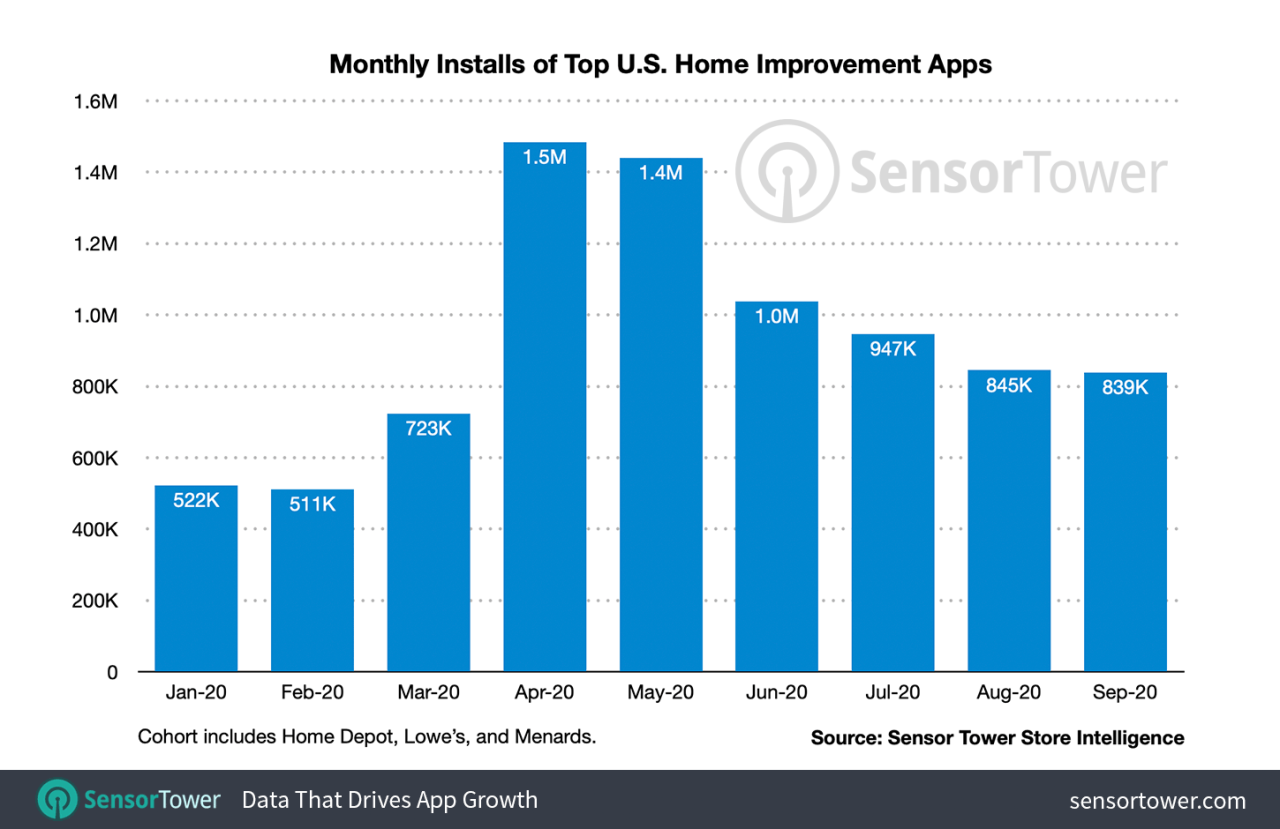
Budgeting tools are essential features in home improvement apps as they provide users with the ability to plan their projects with financial awareness. Effective budgeting helps homeowners set realistic expectations, avoid overspending, and manage their resources efficiently. By incorporating these tools, users can ensure their projects stay on track both financially and in terms of scope.
Users can set budgets within these apps by inputting their overall project costs and anticipated expenses for materials and labor. These budgeting tools often allow users to categorize their spending, making it easier to track expenditures against the set budget. Many apps come equipped with features that enable real-time updates, so users can see how their spending aligns with their initial projections. Managing costs becomes straightforward as users can adjust their budget based on real-time data, allowing them to make informed decisions about where to cut costs or where to spend more.
Maximizing Effectiveness of Budgeting Features
To fully utilize the budgeting features available in home improvement apps, certain strategies can enhance users’ experience and outcomes. Understanding the app’s functionalities is crucial for effective budgeting. Here are some tips:
1. Set a Realistic Budget: Assess the total cost of materials, labor, permits, and unexpected expenses. A precise budget helps in avoiding financial strain during the project.
2. Use Cost Tracking Features: Regularly enter expenses as they occur to maintain an accurate overview of spending. This feature can prevent running over budget.
3. Categorize Expenses: Break down the budget into categories such as materials, labor, and permits. This approach allows for easier tracking and management of specific areas where costs might escalate.
4. Review and Adjust Budget Regularly: As the project progresses, review the budget frequently. Adjust it based on actual spending and new estimates to ensure financial control throughout the project.
5. Leverage Alerts and Notifications: Many apps offer notification features that alert users when they are approaching their budget limits. Use these alerts to make timely decisions.
6. Explore Cost-Saving Tips Offered by the App: Some apps provide insights on where to save money based on user trends. Taking advantage of these suggestions can lead to significant savings.
To illustrate, consider a homeowner planning to remodel a kitchen. By setting an initial budget of $15,000, categorizing expenses into cabinetry, appliances, and labor, and regularly updating these figures as purchases are made, they can keep their financial goals in check. If they find that cabinetry costs exceed initial estimates, they can adjust by exploring budget-friendly alternatives, ensuring that the overall project remains viable financially.
“Effective budgeting tools empower homeowners to manage costs expertly, paving the way for successful home improvement projects.”
User Interface Design Considerations for Home Improvement Apps
Creating an engaging and effective user interface (UI) is crucial for home improvement applications. The design should not only be visually appealing but also functional, ensuring that users can navigate the app effortlessly while accessing the tools and resources they need for their home projects. A well-thought-out UI can enhance user experience and drive engagement, leading to higher retention rates and increased satisfaction.
Intuitive navigation plays a pivotal role in user satisfaction and engagement. When users can easily find what they are looking for, whether it’s project ideas, tutorials, or product listings, they are more likely to stick around and explore more features. A seamless navigation experience reduces frustration and enhances the overall usability of the application, making it vital for developers to prioritize this aspect in their design process.
Best Practices in User Interface Design
To create a successful home improvement app, consider the following best practices in user interface design:
- Simple Layout: Use a clean and organized layout that minimizes clutter. Users should be able to scan the screen quickly to find relevant information without feeling overwhelmed.
- Consistent Design Elements: Maintain uniformity in colors, fonts, and icons throughout the app. Consistency helps users familiarize themselves with the app’s navigation and features.
- Responsive Design: Ensure that the app performs well on various devices and screen sizes. A responsive design adapts seamlessly, providing a smooth experience whether on a smartphone, tablet, or desktop.
- Clear Call-to-Action Buttons: Buttons should be easily identifiable and convey clear actions. For instance, labels like “Start Project,” “View Products,” or “Get Help” can guide users effectively.
- Search Functionality: Incorporate a robust search feature that allows users to quickly locate specific items, articles, or tools. This can significantly reduce navigation time and improve user satisfaction.
Examples of User-Friendly Home Improvement Apps
Several home improvement apps excel in user-friendly design, setting benchmarks for others in the industry. Notable mentions include:
- Houzz: This app combines a clean interface with intuitive navigation. Users can browse through a myriad of design ideas, and the search function helps them find inspiration tailored to their preferences. The app also features an integrated shopping platform, making it easier for users to purchase products directly.
- HomeAdvisor: Known for its user-centric design, HomeAdvisor offers a straightforward booking process for home services. The app features an easy-to-use interface allowing users to quickly find professionals in their area, read reviews, and schedule appointments.
- Pinterest: While not strictly a home improvement app, Pinterest is widely used for DIY projects. Its visual-heavy layout allows users to pin ideas and organize their inspirations into boards, creating a visually appealing user experience that is easy to navigate.
“A well-designed user interface is not just about aesthetics; it’s about creating a seamless experience that guides users effortlessly through their journey.”
Community Engagement Features in Home Improvement Apps
In today’s digital age, community engagement features play a vital role in home improvement apps by enhancing user interaction and providing valuable support. Users not only seek tools and resources for their projects but also look for a sense of belonging and shared experiences with others. By fostering a collaborative environment, these features significantly improve user satisfaction and project outcomes.
Community features like forums, chat rooms, and social sharing capabilities create spaces where users can connect, share insights, and seek advice. These functionalities empower users to interact with one another, exchange ideas, and offer support, establishing a network that enhances the overall user experience.
Collaborative Spaces within Home Improvement Apps
The integration of collaborative spaces within home improvement apps serves as a foundation for user engagement. These spaces allow users to participate in discussions, seek advice, and share their own project experiences.
Forums provide a platform for users to ask questions and receive answers from fellow DIY enthusiasts or seasoned professionals. By categorizing discussions by topic, users can easily navigate to areas that interest them, whether they’re looking for landscaping tips or renovation strategies.
Chat rooms offer real-time communication, allowing users to interact instantly. This immediacy can lead to quicker resolutions to project challenges or simply facilitate casual conversation about home improvement trends.
Social sharing features, such as posting photos of completed projects or sharing DIY tips on social media, not only showcase user creativity but also inspire others to embark on their own home improvement journeys. This sharing fosters a community spirit and encourages collaboration among users.
The success of community engagement strategies can be seen in various apps that have effectively implemented these features. For instance, platforms like Houzz encourage users to interact by allowing them to save ideas to their personal boards and engage in discussions within the community. Users can ask for feedback on their projects, leading to constructive criticism and innovative ideas.
Another example is Pinterest, which, while not solely a home improvement app, has become a valuable resource for users looking for inspiration and guidance. The ability to pin ideas and share boards with others creates a collaborative space where users can connect over shared interests.
In summary, community engagement features are crucial in home improvement apps, as they enhance user interactions, foster collaboration, and provide a support system that enriches the overall experience for users. By leveraging forums, chat rooms, and social sharing, these apps create a thriving community of like-minded individuals eager to learn, share, and grow together.
The Future of Home Improvement Apps and Emerging Trends
The landscape of home improvement apps is rapidly evolving, driven by technological advancements and changing consumer needs. As people increasingly turn to their smartphones for guidance and support in home renovation projects, the future promises a blend of innovation and user-friendly features that enhance the home improvement experience. With the integration of more sophisticated technologies, these apps are set to revolutionize how users approach their home projects.
The future developments in home improvement app technology are poised to bring immersive experiences, making it easier for users to visualize changes in their homes. Augmented reality (AR) and virtual reality (VR) are expected to become integral parts of these apps, enabling users to see how different designs, colors, and layouts would look in their actual spaces. For instance, an app might allow a user to project a new kitchen design onto their existing space, helping them make informed decisions before any physical work begins. This shift towards interactive design tools is likely to be complemented by advanced AI algorithms that personalize recommendations based on user preferences and past behaviors.
Integration of Artificial Intelligence in Home Improvement Apps
The integration of artificial intelligence (AI) is set to reshape user interactions with home improvement apps. AI can enhance the user experience by offering tailored content, predictive analytics, and personalized project suggestions. Consumers will benefit from:
- Smart Project Recommendations: AI algorithms can analyze user behavior and preferences to suggest projects that align with individual styles and needs. For example, if a user frequently browses contemporary living room designs, the app may recommend similar upgrades.
- Cost Estimation Tools: Advanced AI can provide accurate cost estimates for projects based on user inputs, local pricing data, and material selections, helping consumers budget more effectively.
- Real-Time Assistance: Chatbots powered by AI can offer instant support for users facing issues or needing advice during their projects, ensuring they have assistance when they need it most.
The implications of these trends are significant for both consumers and developers. For consumers, the enhanced functionality of apps will lead to a more engaging and efficient home improvement process. On the developer side, there will be a demand for continuous innovation to keep up with emerging technologies and user expectations. Developers must focus on creating seamless interfaces that incorporate these advanced features while ensuring the apps remain intuitive and easy to navigate.
The integration of AI in home improvement apps will transform user experience, making the renovation process more personalized and efficient.
Safety Features and Guidelines Provided by Home Improvement Apps
Home improvement apps play a crucial role in helping users manage their DIY projects effectively while ensuring safety throughout the process. These applications are not just about providing tools and materials; they also focus on creating a safer environment for users by integrating vital safety features and guidelines. This approach helps prevent injuries and accidents, making home improvement tasks more enjoyable and less risky.
Incorporating safety features into home improvement apps is essential for promoting responsible practices among users. These features guide users through potential hazards and provide recommendations to mitigate risks associated with various projects. A well-designed app will include safety reminders, equipment checks, and instructional videos that demonstrate best practices. By using these tools, users can significantly reduce the likelihood of accidents occurring during their home improvement endeavors.
Critical Safety Features in Home Improvement Apps
Essential safety features in home improvement apps serve to educate users about necessary precautions and procedures. The following elements are fundamental for effective safety management in these applications:
- Safety Checklists: Many home improvement apps offer customizable safety checklists that ensure users assess the dangers associated with their projects, such as working with ladders or using power tools.
- Hazard Recognition Tools: These tools help users identify common hazards in their workspace, such as electrical risks or potential slip and fall spots, allowing them to take preventive actions.
- Video Tutorials: Visual guides can demonstrate proper techniques for using tools safely, which is particularly useful for novice DIYers who may not be familiar with best practices.
- Emergency Contact Features: Some apps provide quick access to emergency services or first aid resources, ensuring users can respond promptly in case of an accident.
- Equipment Safety Ratings: Users can access information on the safety ratings of tools and materials, helping them make informed decisions about which items to use for their projects.
These features collectively enhance user awareness and preparedness, minimizing the risks associated with home improvement activities.
Examples of Safety Guidelines Offered by Popular Home Improvement Apps
Numerous home improvement apps provide specific safety guidelines tailored to various tasks, helping users navigate projects with greater confidence. Here are some notable examples:
- Home Depot App: This app includes a dedicated safety section that Artikels essential precautions for various home improvement projects, such as the importance of wearing personal protective equipment (PPE) like gloves and goggles while working.
- Lowe’s App: Lowe’s app features a safety guide that covers a range of topics, from ladder safety to secure tool storage, ensuring users maintain a safe working environment.
- TaskRabbit App: TaskRabbit not only connects users with professionals but also offers safety tips on hiring skilled workers, including verifying credentials and discussing job risks before work begins.
These examples underscore the importance of safety guidelines in home improvement apps, as they equip users with the knowledge needed to prevent accidents and handle tools responsibly, ultimately fostering a safer DIY culture.
Comparing Subscription Models of Home Improvement Apps
In today’s digital age, home improvement apps have become essential tools for both DIY enthusiasts and professional contractors. With the variety of subscription models available, users must navigate through free and paid options to determine which best suits their needs. Analyzing these subscription models helps users make informed choices that align with their project goals and budget.
Home improvement apps typically offer various subscription models that cater to different user segments and requirements. These models can be broadly categorized into free versions, freemium options, and premium subscriptions. Each model presents unique benefits and drawbacks that can significantly impact the user experience.
Subscription Models Overview
Understanding the differences between subscription models is crucial for users to choose the right app. Below is a breakdown of the main types of subscription models available:
- Free Versions: These apps offer basic features at no cost, making them accessible to everyone. Users can benefit from essential tools like project calculators and basic design templates.
- Freemium Models: Freemium apps provide basic functionalities for free, with the option to upgrade for advanced features. This model allows users to test the app before committing financially, which can be particularly beneficial for those on a tight budget.
- Premium Subscriptions: This model requires a monthly or annual fee but offers a comprehensive suite of features, including personalized project support, exclusive design tools, and access to a network of professionals. Users who opt for a premium subscription typically receive enhanced functionality and customer service.
Each model has its own advantages and disadvantages, which can heavily influence a user’s decision.
Benefits and Drawbacks of Free Versus Paid Features
When considering whether to opt for a free app or a paid subscription, users should weigh the benefits and drawbacks of each.
- Benefits of Free Versions:
- Cost-effective solution for casual users or those exploring home improvement projects.
- Access to essential tools without any financial commitment.
- Drawbacks of Free Versions:
- Limited features and functionalities, which may hinder complex projects.
- Potential for ads that can disrupt user experience.
- Benefits of Paid Features:
- Access to advanced tools and resources that facilitate more complex home improvement projects.
- Enhanced customer support and community access, allowing users to seek expert advice.
- Drawbacks of Paid Features:
- Ongoing costs that may not be justified for users with less frequent project needs.
- Some users may feel overwhelmed by the number of features included in premium subscriptions.
Choosing the right subscription model should be based on specific user needs and the types of projects they intend to undertake.
Recommendations for Choosing the Right Model
Selecting the appropriate subscription model requires an understanding of the user’s project scope and budget. Here are some considerations to help users make their choice:
- Assess the frequency of projects: For users who engage in occasional home improvement tasks, a free version or freemium model may suffice.
- Evaluate the complexity of projects: Those involved in larger, multifaceted projects should consider a premium subscription to access robust tools and expert support.
- Analyze budget constraints: Users should factor in their budget for app subscriptions, weighing potential savings from free apps against the value offered by premium features.
- Explore user reviews and comparisons: Feedback from other users can provide insights into the efficacy and reliability of various subscription models.
By evaluating these factors, users can make informed decisions that optimize their home improvement efforts while staying within budget.
How Home Improvement Apps Cater to Professional Contractors
Home improvement apps have evolved significantly to cater to the specific needs of professional contractors, providing a suite of tools designed to enhance their productivity and streamline workflows. With the growing demand for efficient project management and communication, these apps serve as indispensable resources that allow contractors to focus on delivering high-quality results while minimizing administrative burdens.
These apps are designed to meet the unique challenges faced by professional contractors, offering functionalities that simplify various aspects of their work. From project estimation to client communication, home improvement apps integrate multiple features that save time and reduce complexity.
Tools and Resources for Contractors
The tools and resources provided by home improvement apps are vital for contractors looking to optimize their operations. They enable efficient management of tasks, budgets, and schedules, ensuring projects run smoothly. Here are some key features and tools that are particularly beneficial for professional contractors:
- Project Management Tools: These features allow contractors to plan, execute, and monitor projects effectively. Apps like CoConstruct and Buildertrend enable users to manage timelines, assign tasks, and track progress in real time.
- Estimation and Invoicing: Accurate budgeting is crucial in construction. Apps such as QuickBooks and Xero provide tools for estimating costs and generating invoices, ensuring clarity in financial dealings with clients.
- Client Communication: Maintaining clear communication with clients is essential. Apps like Houzz and Thumbtack facilitate easy messaging and sharing of project updates, which enhance client satisfaction.
- Inventory and Material Management: Efficient tracking of materials is essential for avoiding delays. Apps like JobFLEX help contractors manage inventory and ensure timely procurement of supplies.
- Time Tracking: Time management tools enable contractors to log hours and monitor productivity. Apps like Harvest help track the time spent on different tasks, ensuring accurate billing and project tracking.
A well-known app among professionals is PlanGrid, which allows contractors to manage blueprints and project designs digitally. This feature ensures that all team members are on the same page with up-to-date plans, minimizing the risk of errors on-site. Additionally, the ability to annotate and share documents in real time enhances collaboration among team members.
“Home improvement apps transform the way contractors operate, providing essential tools that promote efficiency and enhance overall project management.”
Another popular app, Fieldwire, offers robust task management and reporting features, enabling contractors to assign tasks and monitor progress from mobile devices. This flexibility allows on-site teams to stay organized and communicate effectively without the need to return to the office.
In summary, home improvement apps are not just tools; they are comprehensive solutions that address the unique needs of professional contractors, helping them enhance productivity, streamline communication, and ultimately deliver exceptional results for their clients.
Conclusion
In conclusion, home improvement apps are transforming the DIY landscape by making home projects more manageable, engaging, and collaborative. As technology evolves, these applications will continue to enhance user experiences, ensuring that your next home improvement endeavor is not only successful but also enjoyable.
Frequently Asked Questions
What are some popular home improvement apps?
Some popular home improvement apps include Houzz, HomeAdvisor, and TaskRabbit, each offering unique tools and features for users.
Can I use home improvement apps for professional projects?
Yes, many home improvement apps have features catered to professional contractors, helping them manage projects efficiently.
Are home improvement apps free to use?
Many home improvement apps offer free versions, but some features may require a subscription or one-time purchase.
How can augmented reality enhance my DIY experience?
Augmented reality allows users to visualize renovations in real-time, helping them make informed decisions before committing to changes.
Do home improvement apps provide safety guidelines?
Yes, most home improvement apps include safety guidelines to help users avoid hazards while undertaking projects.